构建语音智能体
某些传输层(例如默认的 OpenAIRealtimeWebRTC)会自动为您处理音频输入和输出。对于 OpenAIRealtimeWebSocket 等其他传输机制,您必须自行处理会话音频:
import {  RealtimeAgent,  RealtimeSession,  TransportLayerAudio,} from '@openai/agents/realtime';
const agent = new RealtimeAgent({ name: 'My agent' });const session = new RealtimeSession(agent);const newlyRecordedAudio = new ArrayBuffer(0);
session.on('audio', (event: TransportLayerAudio) => {  // play your audio});
// send new audio to the agentsession.sendAudio(newlyRecordedAudio);当底层传输机制支持时,session.muted 会报告当前静音状态,而 session.mute(true | false) 会切换麦克风采集状态。OpenAIRealtimeWebSocket 不支持静音:session.muted 返回 null,而 session.mute() 会抛出异常。因此,在 WebSocket 设置中,您应在本地暂停采集,并停止调用 sendAudio(),直到需要重新启用麦克风。
创建 RealtimeSession 时配置会话本身,通常通过 model 选项和 config 对象完成。connect(...) 用于处理连接时的事项,例如凭据、端点 URL,以及附加到现有 Realtime 通话,而不是设置任意会话字段。
import { RealtimeAgent, RealtimeSession } from '@openai/agents/realtime';
const agent = new RealtimeAgent({  name: 'Greeter',  instructions: 'Greet the user with cheer and answer questions.',});
const session = new RealtimeSession(agent, {  model: 'gpt-realtime-2.1',  config: {    outputModalities: ['audio'],    reasoning: {      effort: 'low',    },    parallelToolCalls: true,    audio: {      input: {        format: 'pcm16',        transcription: {          model: 'gpt-live-transcribe',          delay: 'low',          prompt:            'A software support conversation about the OpenAI Agents SDK.',          keywords: ['OpenAI Agents SDK', 'RealtimeSession'],          languages: ['en', 'ja'],        },      },      output: {        format: 'pcm16',      },    },  },});
SDK 会在底层将此配置规范化为 Realtime session.update 结构。如果您需要使用 RealtimeSessionConfig 中没有对应属性的原始会话字段,请使用 providerData,或通过 session.transport.sendEvent(...) 发送原始 session.update。
建议使用较新的 SDK 配置结构,包括 outputModalities、audio.input 和 audio.output。为保持向后兼容,SDK 仍会规范化 modalities、inputAudioFormat、outputAudioFormat、inputAudioTranscription 和 turnDetection 等旧别名,但新代码应使用此处展示的嵌套 audio 结构。
对于 gpt-realtime-2.1 等具备推理能力的 Realtime 模型,请在会话配置中设置 reasoning.effort。更高的推理强度可能增加延迟和令牌用量。如果需要控制模型是否可以并行调用多个工具,您还可以设置 parallelToolCalls。
对于输入转录,audio.input.transcription 接受正式发布的转录模型及其上下文选项。使用 gpt-live-transcribe 可实现低延迟流式转录;其 delay 设置可在更快生成部分转录文本和提升最终转录质量之间进行权衡。gpt-live-transcribe 和 gpt-transcribe 均接受自由格式的 prompt、字面量 keywords 和 languages 数组。这些模型使用 languages;接受单个语言提示的旧转录模型仍使用单数形式的 language 字段。有关特定模型的工作流,请参阅官方的转录上下文指南和 Realtime 转录指南。
对于语音到语音会话,通常应选择 outputModalities: ['audio'],以同时获得音频输出和转录文本。仅当需要纯文本响应时,才切换为 ['text']。
对于 RealtimeSessionConfig 中没有对应参数的新参数,可以使用 providerData。传入 providerData 的所有内容都会作为原始 session 对象的一部分转发。
还可以在构造时设置以下 RealtimeSession 选项:
| 选项 | 类型 | 用途 |
|---|---|---|
context | TContext | 合并到会话上下文中的额外本地上下文。 |
historyStoreAudio | boolean | 在本地历史记录快照中存储音频数据(默认禁用)。 |
outputGuardrails | RealtimeOutputGuardrail[] | 会话的输出护栏(请参阅护栏)。 |
outputGuardrailSettings | { debounceTextLength?: number } | 护栏运行频率。默认为 100;设置为 -1 可仅在完整文本可用时运行一次。 |
tracingDisabled | boolean | 禁用会话追踪。 |
groupId | string | 跨会话或后端运行对追踪进行分组。需要设置 workflowName。 |
traceMetadata | Record<string, any> | 附加到会话追踪的自定义元数据。需要设置 workflowName。 |
workflowName | string | 追踪工作流的易读名称。 |
automaticallyTriggerResponseForMcpToolCalls | boolean | MCP 工具调用完成时自动触发模型响应(默认值:true)。 |
toolErrorFormatter | ToolErrorFormatter | 自定义返回给模型的工具审批拒绝消息。 |
toolExecution | RealtimeToolExecutionConfig | 本地 Realtime 函数工具的 SDK 端执行设置。设置 preApprovalInputGuardrails: true 可在发出待处理的审批请求之前运行输入护栏。 |
connect(...) 选项:
| 选项 | 类型 | 用途 |
|---|---|---|
apiKey | string | (() => string | Promise<string>) | 此连接使用的 API 密钥(或延迟加载器)。 |
model | OpenAIRealtimeModels | string | 存在于传输层选项类型中。对于 RealtimeSession,请在构造函数中设置模型;原始传输机制也可以在连接时使用模型。 |
url | string | 可选的自定义 Realtime 端点 URL。 |
callId | string | 将 WebSocket 传输机制作为旁路连接附加到现有 Realtime 通话,包括通过 WebRTC 或 SIP 建立的通话。 |
对话生命周期
Section titled “对话生命周期”RealtimeSession 构建在长期运行的 Realtime 连接之上。它会保存对话历史记录的本地副本、监听传输事件、运行工具和输出护栏,并使当前智能体配置与传输机制保持同步。
底层 API 的行为仍然很重要:
- 连接成功后会先触发
session.created事件,后续配置更改会触发session.updated。 - 大多数会话属性都可以随时间更改,但
model无法在对话期间更改,voice只能在会话尚未生成音频输出时更改。追踪也应预先决定,因为 Realtime API 不允许在启用后修改追踪设置。 - Realtime API 目前将单个会话限制为 60 分钟。
- 输入音频转录是异步进行的,因此最新话语的转录文本可能在响应生成已经开始后才到达。
在 SDK 层,await session.connect() 表示”传输机制已准备就绪,可以开始对话”,但具体时点因传输机制而异:
- 在默认的浏览器 WebRTC 传输机制中,数据通道一打开,SDK 就会发送初始
session.update,并尝试等待相应的session.updated事件后再完成connect()。WebRTC 传输机制等待此确认,是为了避免在应用您的 instructions、工具和模态之前,音频就已到达服务器。如果始终未收到确认,connect()会在短暂超时后回退为完成状态。 - 在默认的服务器端 WebSocket 传输机制中,套接字打开且初始配置发送后,
connect()即完成。因此,对应的session.updated事件可能在connect()已完成后才到达。
如果需要了解原始事件模型,请将官方的 Realtime 对话指南与本页结合阅读。
轮次检测与语音活动检测
Section titled “轮次检测与语音活动检测”默认情况下,Realtime 会话使用内置的语音活动检测(VAD),以便 API 判断用户何时开始或停止说话,以及何时创建响应。SDK 通过 audio.input.turnDetection 提供此功能。
import { RealtimeSession } from '@openai/agents/realtime';import { agent } from './agent';
const session = new RealtimeSession(agent, {  model: 'gpt-realtime-2.1',  config: {    audio: {      input: {        turnDetection: {          type: 'semantic_vad',          eagerness: 'medium',          createResponse: true,          interruptResponse: true,        },      },    },  },});
两种常见模式如下:
semantic_vad旨在提供更自然的轮次边界;当用户听起来尚未说完时,它可以多等待一段时间。server_vad更依赖阈值,并提供threshold、prefixPaddingMs、silenceDurationMs和idleTimeoutMs等设置。
如果想自行管理轮次边界,请将 audio.input.turnDetection 设置为 null。官方的语音活动检测指南和 Realtime 对话指南更详细地介绍了底层行为。
启用 VAD 后,用户在智能体响应期间说话可以中断当前响应。在 WebSocket 传输机制中,SDK 会监听 input_audio_buffer.speech_started,将助理音频截断到用户实际听到的位置,并发出 audio_interrupted 事件。当您在 WebSocket 设置中自行管理播放时,此事件尤其有用。
import { session } from './agent';
session.on('audio_interrupted', () => {  // handle local playback interruption});
如果想提供手动停止按钮,请自行调用 interrupt():
import { session } from './agent';
session.interrupt();// This still triggers `audio_interrupted` so your UI can stop playback
WebRTC 和 WebSocket 都会停止正在进行的响应,但底层机制因传输方式而异。WebRTC 会为您清除已缓冲的输出音频。在 WebSocket 设置中,您仍需自行停止本地播放;当相应的截断事件和对话事件从传输机制返回时,本地历史记录才会更新。
如果想向实时对话发送键入的输入或其他结构化用户内容,请使用 sendMessage()。
import { RealtimeSession, RealtimeAgent } from '@openai/agents/realtime';
const agent = new RealtimeAgent({  name: 'Assistant',});
const session = new RealtimeSession(agent, {  model: 'gpt-realtime-2.1',});
session.sendMessage('Hello, how are you?');
这适用于混合文本和语音的 UI、带外上下文注入,或为口语输入搭配明确的键入说明。
Realtime 语音到语音会话也可以包含图像。在 SDK 中,使用 addImage() 将图像附加到当前对话。
import { RealtimeAgent, RealtimeSession } from '@openai/agents/realtime';
const agent = new RealtimeAgent({  name: 'Assistant',});
const session = new RealtimeSession(agent, {  model: 'gpt-realtime-2.1',});
const imageDataUrl = 'data:image/png;base64,...';
session.addImage(imageDataUrl, { triggerResponse: false });session.sendMessage('Describe what is in this image.');
传入 triggerResponse: false 后,可以先将图像与之后的文本或音频轮次一起批量提交,再请求模型响应。这与官方的 Realtime 对话图像输入指南一致。
手动响应控制
Section titled “手动响应控制”在较高层级的 SDK 中,sendMessage() 和 addImage() 默认会为您触发响应。处理原始传输事件、按键通话流程或自定义审核/验证步骤时,手动响应控制非常重要。
import { RealtimeAgent, RealtimeSession } from '@openai/agents/realtime';
const agent = new RealtimeAgent({  name: 'Greeter',  instructions: 'Greet the user with cheer and answer questions.',});
const session = new RealtimeSession(agent, {  model: 'gpt-realtime-2.1',});
session.transport.on('*', (event) => {  // Event received from the underlying Realtime transport});
// Send any valid client event, for example, to trigger a new responsesession.transport.sendEvent({  type: 'response.create',  // ...});
常见情况有两种:
- 如果通过
audio.input.turnDetection = null完全禁用 VAD,您需要负责提交音频轮次,然后发送response.create。 - 如果保留 VAD,但将
turnDetection.interruptResponse = false和turnDetection.createResponse = false,API 仍会检测轮次,但由您负责创建响应。
如果想在模型响应前检查或审核用户输入,可以保留 VAD,同时将 turnDetection.interruptResponse 和 turnDetection.createResponse 均设置为 false。此配置符合官方 Realtime 对话指南中关于禁用自动响应的说明。
与普通智能体类似,您可以使用交接将智能体拆分为多个智能体,并在它们之间进行编排,从而提升性能并更好地限定问题范围。
import { RealtimeAgent } from '@openai/agents/realtime';
const mathTutorAgent = new RealtimeAgent({  name: 'Math Tutor',  handoffDescription: 'Specialist agent for math questions',  instructions:    'You provide help with math problems. Explain your reasoning at each step and include examples',});
const agent = new RealtimeAgent({  name: 'Greeter',  instructions: 'Greet the user with cheer and answer questions.',  handoffs: [mathTutorAgent],});
与普通智能体不同,语音智能体的交接行为略有差异。执行交接时,当前会话会直接更新为新的智能体配置。因此,新智能体会自动获得当前对话历史记录,并且目前不会应用输入过滤器。
由于会话保持实时运行,该会话使用的模型不会在交接期间发生变化。语音更改遵循底层 Realtime API 的规则:只有在会话尚未生成音频输出时才会生效。Realtime 交接主要用于在同一会话的不同 RealtimeAgent 配置之间切换;如果需要使用其他模型,例如 gpt-5.4 之类的推理模型,或委派给非 Realtime 后端智能体,请使用通过工具进行委派。
与普通智能体一样,语音智能体可以调用工具来执行操作。Realtime 支持函数工具(本地执行)和托管 MCP 工具(由 Realtime API 远程执行)。您可以使用与普通智能体相同的 tool() 辅助函数定义函数工具。
仅适用于 Responses 的工具选项不会沿用到语音智能体。函数工具中包含 'programmatic' 的 outputSchema 和 allowedCallers 值会被拒绝,托管 MCP 工具中的编程式调用方也同样会被拒绝。请在 Realtime 会话中使用可直接调用的函数工具或托管 MCP 工具,或将需要编程式工具调用(Programmatic Tool Calling)的工作委派给 Responses 智能体。
import { tool, RealtimeAgent } from '@openai/agents/realtime';import { z } from 'zod';
const getWeather = tool({  name: 'get_weather',  description: 'Return the weather for a city.',  parameters: z.object({ city: z.string() }),  async execute({ city }) {    return `The weather in ${city} is sunny.`;  },});
const weatherAgent = new RealtimeAgent({ name: 'Weather assistant', instructions: 'Answer weather questions.', tools: [getWeather],});函数工具与 RealtimeSession 在同一环境中运行。这意味着,如果会话在浏览器中运行,工具也会在浏览器中执行。如果需要执行敏感操作,请从工具内部调用后端,让服务器完成需要特权的工作。
这样,浏览器端工具就可以充当通往服务器端逻辑的轻量级反向通道。例如,examples/realtime-next 在浏览器中定义了 refundBackchannel 工具,它会将请求和当前对话历史记录转发给服务器上的 handleRefundRequest(...)。服务器上的另一个 Runner 可以使用不同的智能体或模型评估退款,然后将结果返回给语音会话。
托管 MCP 工具
Section titled “托管 MCP 工具”可以使用 hostedMcpTool 配置托管 MCP 工具,这些工具会远程执行。当 MCP 工具的可用性发生变化时,会话会发出 mcp_tools_changed。若要防止会话在 MCP 工具调用完成后自动触发模型响应,请设置 automaticallyTriggerResponseForMcpToolCalls: false。
当前经过过滤的 MCP 工具列表也可通过 session.availableMcpTools 获取。该属性和 mcp_tools_changed 事件都只反映当前智能体上已启用的托管 MCP 服务器,并且会应用智能体配置中的所有 allowed_tools 过滤器。
如果将安全服务器选择、请求头和审批视为连接前配置,托管 MCP 的设置会更容易理解。在 RealtimeSession.connect() 打开传输机制之前,SDK 会解析当前智能体的托管 MCP 工具定义,并将支持的 MCP 字段纳入发送给 Realtime API 的初始会话配置。
在浏览器 WebRTC 应用中,尤其应在 connect() 之前提供安全的托管 MCP 配置。临时客户端密钥始终在服务器上生成,因此,任何必须保密的托管 MCP 凭据或自定义 headers 都应作为初始 session 载荷的一部分,附加到服务器端的 POST /v1/realtime/client_secrets 请求中。不要将长期有效的凭据放入浏览器代码,也不要计划在 connect() 启动后再添加这些凭据。
在 Realtime API 层,后续的 session.update 调用仍可以更改工具和其他可变会话字段;当当前智能体发生变化时,SDK 本身也会发送 session.update。不过,在浏览器应用中,应将安全的托管 MCP 初始化视为连接前的服务器端事项,并确保浏览器端的 RealtimeSession 配置与服务器生成密钥时使用的配置保持一致。
工具执行期间,智能体无法处理用户的新请求。一种改善体验的方法是,让智能体在即将执行工具时先进行说明,或说出特定短语,为工具执行争取一些时间。
如果函数工具应在完成后不立即触发另一个模型响应,请从 @openai/agents/realtime 返回 backgroundResult(output)。这样会将工具输出发送回会话,同时仍由您控制是否触发响应。
函数工具的超时选项(timeoutMs、timeoutBehavior、timeoutErrorFunction)在 Realtime 会话中的工作方式相同。使用默认的 error_as_result 时,超时消息会作为工具输出发送。使用 raise_exception 时,会话会发出包含 ToolTimeoutError 的 error 事件,并且不会为该调用发送工具输出。
对话历史记录访问
Section titled “对话历史记录访问”除了智能体调用特定工具时传入的参数外,您还可以访问 Realtime 会话当前追踪的对话历史记录快照。如果需要根据对话当前状态执行更复杂的操作,或计划使用工具进行委派,此功能会很有用。
import {  tool,  RealtimeContextData,  RealtimeItem,} from '@openai/agents/realtime';import { z } from 'zod';
const parameters = z.object({  request: z.string(),});
const refundTool = tool<typeof parameters, RealtimeContextData>({ name: 'Refund Expert', description: 'Evaluate a refund', parameters, execute: async ({ request }, details) => { // The history might not be available const history: RealtimeItem[] = details?.context?.history ?? []; // Call your backend to process the refund request },});工具执行前审批
Section titled “工具执行前审批”如果使用 needsApproval: true 定义工具,智能体会在执行工具前发出 tool_approval_requested 事件。
通过监听此事件,您可以向用户显示 UI,让用户批准或拒绝工具调用。
使用 await session.approve(request.approvalItem) 或 await session.reject(request.approvalItem) 处理请求。对于函数工具,可以传入 { alwaysApprove: true } 或 { alwaysReject: true },以便在会话的剩余时间内对重复调用复用相同决定;还可以使用 session.reject(request.approvalItem, { message: '...' }),针对该次调用向模型发送自定义拒绝消息。托管 MCP 审批不支持持续沿用批准/拒绝决定;请改用托管 MCP 的 allowedTools 配置限制这些工具。
如果没有传入单次调用的拒绝 message,会话会回退到 toolErrorFormatter(如果已配置),然后再回退到 SDK 的默认拒绝文本。
默认情况下,函数工具输入护栏会在审批后、工具执行前立即运行。如果将 toolExecution: { preApprovalInputGuardrails: true } 传给 new RealtimeSession(...),本地函数工具输入护栏还会在会话发出 tool_approval_requested 前运行。护栏拒绝会将拒绝消息作为工具输出发回,并跳过审批事件。如果护栏允许调用,仍会发出审批事件;在调用 session.approve(...) 后、执行工具前,护栏还会再次运行。
import { session } from './agent';
session.on('tool_approval_requested', (_context, _agent, request) => {  // Show a UI to let the user approve or reject the tool call  // Then resolve the request with `session.approve(...)` or `session.reject(...)`
session.approve(request.approvalItem);});护栏可用于监控智能体所说的内容是否违反一组规则,并立即中断响应。这些检查针对智能体的响应输出流运行。在纯文本会话中,SDK 会评估输出文本增量。在音频会话中,SDK 使用输出音频的转录文本和转录增量,因此关键前提是转录文本可用,而不是使用单独的文本输出模态。
您提供的护栏会在返回模型响应时异步运行,因此可以根据预定义的分类触发条件中断响应,例如”提到了某个特定禁用词”。
护栏触发时,会话会发出 guardrail_tripped 事件。该事件还会提供一个 details 对象,其中包含触发护栏的 itemId。
import {  RealtimeOutputGuardrail,  RealtimeAgent,  RealtimeSession,} from '@openai/agents/realtime';
const agent = new RealtimeAgent({  name: 'Greeter',  instructions: 'Greet the user with cheer and answer questions.',});
const guardrails: RealtimeOutputGuardrail[] = [  {    name: 'No mention of Dom',    async execute({ agentOutput }) {      const domInOutput = agentOutput.includes('Dom');      return {        tripwireTriggered: domInOutput,        outputInfo: { domInOutput },      };    },  },];
const guardedSession = new RealtimeSession(agent, {  outputGuardrails: guardrails,});
默认情况下,护栏每生成 100 个字符运行一次,并在最终转录文本可用时再次运行。由于朗读文本通常比生成转录文本耗时更长,因此护栏往往可以在用户听到不安全输出前将其中断。
如果想修改此行为,可以向会话传入 outputGuardrailSettings 对象。
如果只想在响应结束时对完整生成的转录文本评估一次,请设置 debounceTextLength: -1。
import { RealtimeAgent, RealtimeSession } from '@openai/agents/realtime';
const agent = new RealtimeAgent({  name: 'Greeter',  instructions: 'Greet the user with cheer and answer questions.',});
const guardedSession = new RealtimeSession(agent, {  outputGuardrails: [    /*...*/  ],  outputGuardrailSettings: {    debounceTextLength: 500, // run guardrail every 500 characters or set it to -1 to run it only at the end  },});
对话状态与委派
Section titled “对话状态与委派”对话历史记录管理
Section titled “对话历史记录管理”RealtimeSession 会自动维护本地 history 快照,追踪用户消息、助理输出、工具调用和截断状态。您可以在 UI 中呈现它、在工具内部检查它,或在需要更正或删除条目时更新它。
随着对话发生变化,会话会发出 history_updated。如果需要请求更改历史记录,请使用 updateHistory()。它会要求传输机制对当前历史记录进行差异比较,并发送必要的删除/创建事件;当相应的对话事件返回时,本地 session.history 视图会随之更新。
import { RealtimeSession, RealtimeAgent } from '@openai/agents/realtime';
const agent = new RealtimeAgent({  name: 'Assistant',});
const session = new RealtimeSession(agent, {  model: 'gpt-realtime-2.1',});
await session.connect({ apiKey: '<client-api-key>' });
// listening to the history_updated eventsession.on('history_updated', (history) => {  // returns the full history of the session  console.log(history);});
// Option 1: explicit settingsession.updateHistory([  /* specific history */]);
// Option 2: override based on current state like removing all agent messagessession.updateHistory((currentHistory) => { return currentHistory.filter( (item) => !(item.type === 'message' && item.role === 'assistant'), );});- 目前无法在事后编辑函数工具调用。
- 历史记录中的助理文本取决于可用的转录文本,包括
output_audio.transcript。 - 因中断而截断的响应不会保留最终转录文本。
- 输入音频转录更适合作为用户所说内容的大致参考,而不是模型如何理解音频的精确副本。
通过工具进行委派
Section titled “通过工具进行委派”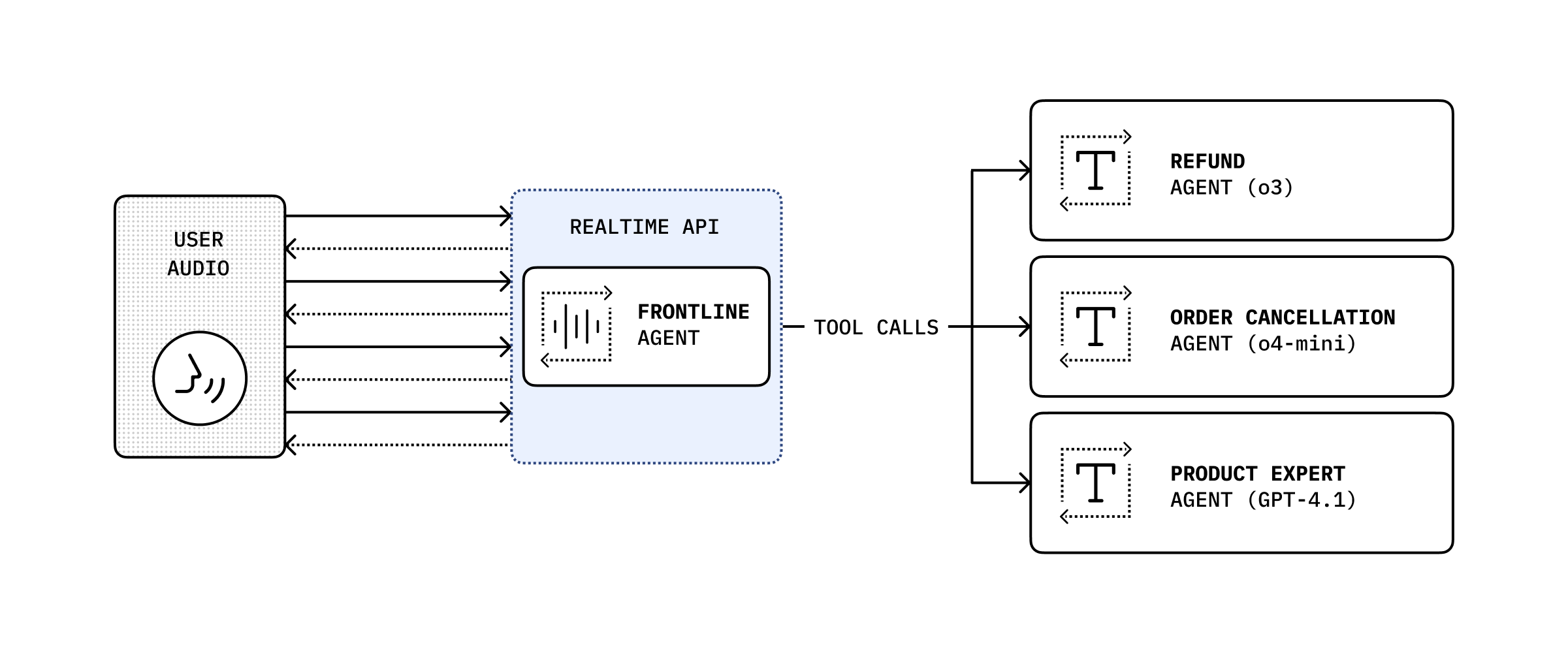
通过结合对话历史记录和工具调用,您可以将对话委派给另一个后端智能体,以执行更复杂的操作,然后将其结果返回给用户。
import {  RealtimeAgent,  RealtimeContextData,  tool,} from '@openai/agents/realtime';import { handleRefundRequest } from './serverAgent';import z from 'zod';
const refundSupervisorParameters = z.object({  request: z.string(),});
const refundSupervisor = tool<  typeof refundSupervisorParameters,  RealtimeContextData>({  name: 'escalateToRefundSupervisor',  description: 'Escalate a refund request to the refund supervisor',  parameters: refundSupervisorParameters,  execute: async ({ request }, details) => {    // This will execute on the server    return handleRefundRequest(request, details?.context?.history ?? []);  },});
const agent = new RealtimeAgent({  name: 'Customer Support',  instructions:    'You are a customer support agent. If you receive any requests for refunds, you need to delegate to your supervisor.',  tools: [refundSupervisor],});
下面的代码随后会在服务器上运行,本例中通过 Next.js Server Action 执行。
// This runs on the serverimport 'server-only';
import { Agent, run } from '@openai/agents';import type { RealtimeItem } from '@openai/agents/realtime';import z from 'zod';
const agent = new Agent({  name: 'Refund Expert',  instructions:    'You are a refund expert. You are given a request to process a refund and you need to determine if the request is valid.',  model: 'gpt-5.4',  outputType: z.object({    reason: z.string(),    refundApproved: z.boolean(),  }),});
export async function handleRefundRequest(  request: string,  history: RealtimeItem[],) {  const input = `The user has requested a refund.
The request is: ${request}
Current conversation history:${JSON.stringify(history, null, 2)}`.trim();
  const result = await run(agent, input);
  return JSON.stringify(result.finalOutput, null, 2);}