Model context protocol (MCP)
Model context protocol (MCP)은 애플리케이션이 언어 모델에 도구와 컨텍스트를 제공하는 방식을 표준화합니다. 공식 문서에서는 다음과 같이 설명합니다.
MCP는 애플리케이션이 LLM에 컨텍스트를 제공하는 방식을 표준화하는 개방형 프로토콜입니다. MCP를 AI 애플리케이션용 USB-C 포트라고 생각할 수 있습니다. USB-C가 기기를 다양한 주변 장치 및 액세서리에 연결하는 표준화된 방식을 제공하듯이, MCP는 AI 모델을 다양한 데이터 소스와 도구에 연결하는 표준화된 방식을 제공합니다.
Agents Python SDK는 여러 MCP 전송 방식을 지원합니다. 따라서 기존 MCP 서버를 재사용하거나 자체 서버를 구축하여 파일 시스템, HTTP 또는 커넥터 기반 도구를 에이전트에 제공할 수 있습니다.
연결 전 MCP 서버 신뢰성 확인
MCP 도구는 모델 컨텍스트의 데이터를 노출하고 제공된 자격 증명을 사용해 작업을 수행할 수 있습니다. 신뢰할 수 있는 서버에만 연결하고, 최소 권한 자격 증명을 사용하며, 액세스 토큰은 URL이 아닌 인증 필드나 헤더에 보관하고, 민감한 작업에는 승인을 요구하세요. OpenAI MCP 보안 지침을 참고하세요.
MCP 통합 선택
MCP 서버를 에이전트에 연결하기 전에 도구 호출을 실행할 위치와 사용할 수 있는 전송 방식을 결정하세요. 아래 표에는 Python SDK가 지원하는 옵션이 요약되어 있습니다.
| 필요한 사항 | 권장 옵션 |
|---|---|
| OpenAI의 Responses API가 모델을 대신해 공개적으로 접근 가능한 MCP 서버를 호출하도록 설정 | HostedMCPTool을 통한 호스티드 MCP 서버 도구 |
| 로컬 또는 원격에서 직접 실행하는 Streamable HTTP 서버에 연결 | MCPServerStreamableHttp을 통한 Streamable HTTP MCP 서버 |
| Server-Sent Events를 사용하는 HTTP를 구현한 서버와 통신 | MCPServerSse를 통한 SSE 기반 HTTP MCP 서버 |
| 로컬 프로세스를 실행하고 stdin/stdout으로 통신 | MCPServerStdio을 통한 stdio MCP 서버 |
아래 섹션에서는 각 옵션의 구성 방법과 특정 전송 방식을 선택해야 하는 경우를 설명합니다.
MCP Python SDK v1 및 v2
Agents SDK는 mcp>=1.19.0,<3 종속성 범위를 통해 mcp Python 패키지의 두 주요 버전을 모두 지원합니다. 설치된 mcp 패키지 버전은 서버와 협상한 MCP 프로토콜 버전과 별개입니다. Agents SDK는 설치된 패키지의 메이저 버전을 감지하여 stdio, SSE, Streamable HTTP 연결에 자동으로 대응하므로 일반적인 서버 구성에는 버전 전환 설정이 필요하지 않습니다.
MCP Python SDK v2가 설치되어 있으면 Agents SDK는 구성된 로컬 전송 방식 주위에 mode="auto"을 적용한 v2 mcp.Client을 생성합니다. 클라이언트는 먼저 설치된 MCP SDK가 지원하는 최신 프로토콜 버전으로 server/discover 프로브를 전송합니다. 최신 서버는 프로브에 응답하며 클라이언트는 그 결과를 채택합니다. 이전 서버가 server/discover을 지원하지 않으면 클라이언트는 레거시 initialize 핸드셰이크로 대체하고 여기에서 협상된 프로토콜 버전을 사용합니다. 따라서 MCP Python SDK v2를 설치하더라도 모든 연결에서 최신 MCP 프로토콜 버전을 사용하도록 강제되지는 않습니다. MCP Python SDK의 프로토콜 버전 협상 가이드를 참고하세요.
대부분의 애플리케이션에서는 종속성 해석기가 호환되는 버전을 선택하도록 두는 것이 좋습니다. 애플리케이션이 특정 메이저 버전을 유지해야 한다면 openai-agents과 함께 명시적 제약 조건을 추가하세요.
HTTP 전송 방식 사용자 지정에는 설치된 MCP 패키지가 소유한 HTTP 스택을 사용해야 합니다.
| 사용자 지정 | MCP Python SDK v1 | MCP Python SDK v2 |
|---|---|---|
params["auth"] |
httpx.Auth |
httpx2.Auth |
params["httpx_client_factory"] 반환 값 |
httpx.AsyncClient |
httpx2.AsyncClient |
MCPServerStreamableHttp params["ignore_initialized_notification_failure"] = True |
지원됨 | 지원되지 않으며 연결 전에 거부됨 |
가능하면 아래 Streamable HTTP 예제와 같이 Authorization 헤더를 사용하세요. Authorization 헤더는 두 패키지 버전에서 변경 없이 작동합니다. 애플리케이션이 params["auth"] 또는 params["httpx_client_factory"]을 제공하는 경우 해당 값은 설치된 mcp 패키지 메이저 버전용 HTTP 타입을 사용해야 합니다. 애플리케이션이 MCPServerStreamableHttp의 params["ignore_initialized_notification_failure"] = True을 설정한 경우 업그레이드 전에 mcp<2을 유지하거나 해당 옵션을 비활성화해야 합니다.
OpenAI Responses API가 원격 MCP 연결을 관리하므로 이러한 로컬 mcp 종속성 요구 사항은 HostedMCPTool에 적용되지 않습니다.
에이전트 수준 MCP 구성
전송 방식 선택 외에도 Agent.mcp_config을 설정하여 MCP 도구를 준비하는 방식을 조정할 수 있습니다.
from agents import Agent

agent = Agent(
    name="Assistant",
    mcp_servers=[server],
    mcp_config={
        # Try to convert MCP tool schemas to strict JSON schema.
        "convert_schemas_to_strict": True,
        # If None, MCP tool failures are raised as exceptions instead of
        # returning model-visible error text.
        "failure_error_function": None,
        # Prefix local MCP tool names with their server name.
        "include_server_in_tool_names": True,
    },
)
참고:
convert_schemas_to_strict은 최선형 방식으로 동작합니다. 스키마를 변환할 수 없으면 원래 스키마가 사용됩니다.failure_error_function은 MCP 도구 호출 실패가 모델에 표시되는 방식을 제어합니다.failure_error_function이 설정되지 않은 경우 SDK는 기본 도구 오류 포매터를 사용합니다.- 서버 수준
failure_error_function은 해당 서버의Agent.mcp_config["failure_error_function"]을 재정의합니다. include_server_in_tool_names은 명시적으로 활성화해야 합니다. 활성화하면 각 로컬 MCP 도구가 결정론적인 서버 접두사 이름으로 모델에 노출되므로 여러 MCP 서버가 같은 이름의 도구를 게시할 때 충돌을 방지하는 데 도움이 됩니다. 생성된 이름은 ASCII 안전성을 보장하고FunctionTool인스턴스의 이름 길이 제한을 준수하며, 동일한 에이전트에서 구성된 로컬FunctionTool인스턴스의 이름이나 활성화된 핸드오프와 충돌하지 않습니다. SDK는 여전히 원래 서버에서 원래 MCP 도구 이름을 호출합니다.
전송 방식 간 공통 패턴
전송 방식을 선택한 후에는 대부분의 통합에서 다음과 같은 결정을 내려야 합니다.
- 도구의 일부만 노출하는 방법(도구 필터링)
- 서버가 재사용 가능한 프롬프트도 제공하는지 여부(프롬프트)
list_tools()캐시 여부(캐싱)- MCP 활동이 트레이스에 표시되는 방식(트레이싱)
로컬 MCP 서버(MCPServerStdio, MCPServerSse, MCPServerStreamableHttp)에서는 승인 정책과 호출별 _meta 페이로드도 공통 개념입니다. Streamable HTTP 섹션에서 가장 완전한 예제를 제공하며, 다른 로컬 전송 방식에도 동일한 패턴이 적용됩니다.
1. 호스티드 MCP 서버 도구
호스티드 툴은 전체 도구 왕복 처리를 OpenAI 인프라에서 수행합니다. 코드에서 도구를 나열하고 호출하는 대신 HostedMCPTool이 서버 레이블과 선택적 커넥터 메타데이터를 Responses API에 전달합니다. 모델은 Python 프로세스에 추가 콜백을 수행하지 않고 원격 서버의 도구를 나열하고 호출합니다. 현재 호스티드 툴은 Responses API의 호스티드 MCP 통합을 지원하는 OpenAI 모델에서 작동합니다.
기본 호스티드 MCP 도구
에이전트의 tools 목록에 HostedMCPTool을 추가하여 호스티드 툴을 생성합니다. tool_config
딕셔너리는 REST API에 전송할 JSON과 동일한 구조입니다.
import asyncio

from agents import Agent, HostedMCPTool, Runner

async def main() -> None:
    agent = Agent(
        name="Assistant",
        instructions="Use the DeepWiki hosted MCP server to inspect openai/openai-agents-python.",
        tools=[
            HostedMCPTool(
                tool_config={
                    "type": "mcp",
                    "server_label": "deepwiki",
                    "server_url": "https://mcp.deepwiki.com/mcp",
                    "require_approval": "never",
                }
            )
        ],
    )

    result = await Runner.run(
        agent,
        "Which language is the repository openai/openai-agents-python written in?",
    )
    print(result.final_output)

asyncio.run(main())
호스티드 서버는 도구를 자동으로 노출하므로 mcp_servers에 추가하지 않습니다.
호스티드 도구 검색을 통해 호스티드 MCP 서버를 지연 로드하려면 tool_config["defer_loading"] = True을 설정하고 에이전트에 ToolSearchTool을 추가하세요. 이 기능은 OpenAI Responses 모델에서만 지원됩니다. 전체 도구 검색 설정과 제약 조건은 도구를 참고하세요.
호스티드 MCP 결과 스트리밍
호스티드 툴은 함수 도구와 정확히 같은 방식으로 결과 스트리밍을 지원합니다. 모델이 작업을 수행하는 동안 증가분 MCP 출력을 사용하려면 Runner.run_streamed을
사용하세요.
result = Runner.run_streamed(agent, "Summarise this repository's top languages")
async for event in result.stream_events():
    if event.type == "run_item_stream_event":
        print(f"Received: {event.item}")
print(result.final_output)
선택적 승인 흐름
서버가 민감한 작업을 수행할 수 있다면 각 도구를 실행하기 전에 사람 또는 프로그램의 승인을 요구할 수 있습니다. tool_config의 require_approval을 단일 정책("always", "never") 또는 도구 이름을 정책에 매핑하는 딕셔너리로 구성하세요. Python 내부에서 결정하려면 on_approval_request 콜백을 제공하세요.
from agents import MCPToolApprovalFunctionResult, MCPToolApprovalRequest

SAFE_TOOLS = {"read_wiki_structure", "read_wiki_contents", "ask_question"}

def approve_tool(request: MCPToolApprovalRequest) -> MCPToolApprovalFunctionResult:
    if request.data.name in SAFE_TOOLS:
        return {"approve": True}
    return {"approve": False, "reason": "Escalate to a human reviewer"}

agent = Agent(
    name="Assistant",
    tools=[
        HostedMCPTool(
            tool_config={
                "type": "mcp",
                "server_label": "deepwiki",
                "server_url": "https://mcp.deepwiki.com/mcp",
                "require_approval": "always",
            },
            on_approval_request=approve_tool,
        )
    ],
)
콜백은 동기식 또는 비동기식일 수 있으며, 모델이 실행을 계속하는 데 승인 데이터가 필요할 때마다 호출됩니다.
커넥터 기반 호스티드 서버
호스티드 MCP는 OpenAI 커넥터도 지원합니다. server_url을 지정하는 대신 connector_id와 액세스 토큰을 제공하세요. Responses API가 인증을 처리하고 호스티드 서버가 커넥터의 도구를 노출합니다.
import os

HostedMCPTool(
    tool_config={
        "type": "mcp",
        "server_label": "google_calendar",
        "connector_id": "connector_googlecalendar",
        "authorization": os.environ["GOOGLE_CALENDAR_AUTHORIZATION"],
        "require_approval": "never",
    }
)
스트리밍, 승인, 커넥터를 포함해 완전히 작동하는 호스티드 툴 샘플은 examples/hosted_mcp에서 확인할 수 있습니다.
2. Streamable HTTP MCP 서버
네트워크 연결을 직접 관리하려면 MCPServerStreamableHttp을 사용하세요. Streamable HTTP 서버는 전송 방식을 직접 제어하거나 짧은 지연 시간을 유지하면서 자체 인프라 내에서 서버를 실행하려는 경우에 적합합니다.
import asyncio
import os

from agents import Agent, Runner
from agents.mcp import MCPServerStreamableHttp
from agents.model_settings import ModelSettings

async def main() -> None:
    token = os.environ["MCP_SERVER_TOKEN"]
    async with MCPServerStreamableHttp(
        name="Streamable HTTP Python Server",
        params={
            "url": "http://localhost:8000/mcp",
            "headers": {"Authorization": f"Bearer {token}"},
            "timeout": 10,
        },
        cache_tools_list=True,
        max_retry_attempts=3,
    ) as server:
        agent = Agent(
            name="Assistant",
            instructions="Use the MCP tools to answer the questions.",
            mcp_servers=[server],
            model_settings=ModelSettings(tool_choice="required"),
        )

        result = await Runner.run(agent, "Add 7 and 22.")
        print(result.final_output)

asyncio.run(main())
생성자는 다음과 같은 추가 옵션을 받습니다.
client_session_timeout_seconds은 MCP ClientSession 읽기 제한 시간을 제어합니다.datetime.timedelta으로 표현할 수 있고 1마이크로초 이상인 유한한 양수 값은 유한한 제한 시간을 설정하며,None및0은 이를 비활성화합니다. 그 외의 값은 서버 생성 시 거부됩니다.use_structured_content은 텍스트 출력보다tool_result.structured_content을 우선할지 여부를 전환합니다.max_retry_attempts및retry_backoff_seconds_base은list_tools()및call_tool()에 자동 재시도를 추가합니다.tool_filter을 사용하면 도구의 일부만 노출할 수 있습니다(도구 필터링 참고).require_approval은 로컬 MCP 도구에서 휴먼인더루프 (HITL) 승인 정책을 활성화합니다.failure_error_function은 모델에 표시되는 MCP 도구 실패 메시지를 사용자 지정합니다. 대신 오류를 발생시키려면None으로 설정하세요.tool_meta_resolver은call_tool()전에 호출별 MCP_meta페이로드를 삽입합니다.
로컬 MCP 서버의 승인 정책
MCPServerStdio, MCPServerSse, MCPServerStreamableHttp은 모두 require_approval을 받습니다.
지원되는 형식:
- 모든 도구에 적용되는
"always"또는"never" True은 모든 도구에 승인을 요구하고,False은 어떤 도구에도 승인을 요구하지 않음(각각"always"및"never"과 동일)- 도구별 맵(예:
{"delete_file": "always", "read_file": "never"}) - 그룹화된 객체:
{"always": {"tool_names": [...]}, "never": {"tool_names": [...]}}
async with MCPServerStreamableHttp(
    name="Filesystem MCP",
    params={"url": "http://localhost:8000/mcp"},
    require_approval={"always": {"tool_names": ["delete_file"]}},
) as server:
    ...
전체 일시 중지/재개 흐름은 휴먼인더루프 (HITL) 및 examples/mcp/get_all_mcp_tools_example/main.py을 참고하세요.
tool_meta_resolver을 활용한 호출별 메타데이터
MCP 서버가 _meta에서 요청 메타데이터(예: 테넌트 ID 또는 트레이스 컨텍스트)를 기대하는 경우 tool_meta_resolver을 사용하세요. 아래 예제에서는 Runner.run(...)에 context으로 dict을 전달한다고 가정합니다.
from agents.mcp import MCPServerStreamableHttp, MCPToolMetaContext


def resolve_meta(context: MCPToolMetaContext) -> dict[str, str] | None:
    run_context_data = context.run_context.context or {}
    tenant_id = run_context_data.get("tenant_id")
    if tenant_id is None:
        return None
    return {"tenant_id": str(tenant_id), "source": "agents-sdk"}


server = MCPServerStreamableHttp(
    name="Metadata-aware MCP",
    params={"url": "http://localhost:8000/mcp"},
    tool_meta_resolver=resolve_meta,
)
실행 컨텍스트가 Pydantic 모델, 데이터 클래스 또는 사용자 지정 클래스라면 속성 접근으로 테넌트 ID를 읽으세요.
MCP 도구 출력: 텍스트, 이미지 및 기타 콘텐츠
MCP 결과가 콘텐츠 블록을 사용하면 SDK는 텍스트 콘텐츠를 텍스트 출력으로 전달하고 이미지 콘텐츠를 도구 출력의 이미지 타입 항목으로 매핑합니다. 오디오 및 리소스 블록을 포함한 다른 MCP 콘텐츠 블록 타입의 경우 SDK는 해당 블록을 유효한 JSON으로 직렬화한 값을 텍스트 출력으로 전달합니다. 여러 콘텐츠 블록이 포함된 응답은 출력 항목 목록으로 전달됩니다. use_structured_content=True이 비어 있지 않고 오류가 없는 structuredContent 페이로드를 선택하면 해당 구조화된 페이로드가 이러한 콘텐츠 블록보다 우선합니다. 구조화된 콘텐츠가 없거나 비어 있으면 콘텐츠 블록으로 대체됩니다.
3. SSE 기반 HTTP MCP 서버
Warning
MCP 프로젝트에서는 Server-Sent Events 전송 방식의 사용을 중단했습니다. 새로운 통합에는 Streamable HTTP 또는 stdio를 사용하고, SSE는 레거시 서버에만 유지하세요.
MCP 서버가 SSE 기반 HTTP 전송 방식을 구현한다면 MCPServerSse을 인스턴스화하세요. 전송 방식을 제외하면 API는 Streamable HTTP 서버와 동일합니다.
from agents import Agent, Runner
from agents.model_settings import ModelSettings
from agents.mcp import MCPServerSse

workspace_id = "demo-workspace"

async with MCPServerSse(
    name="SSE Python Server",
    params={
        "url": "http://localhost:8000/sse",
        "headers": {"X-Workspace": workspace_id},
    },
    cache_tools_list=True,
) as server:
    agent = Agent(
        name="Assistant",
        mcp_servers=[server],
        model_settings=ModelSettings(tool_choice="required"),
    )
    result = await Runner.run(agent, "What's the weather in Tokyo?")
    print(result.final_output)
4. stdio MCP 서버
로컬 하위 프로세스로 실행되는 MCP 서버에는 MCPServerStdio을 사용하세요. SDK는 프로세스를 생성하고 파이프를 열린 상태로 유지하며 컨텍스트 관리자가 종료될 때 자동으로 닫습니다. 이 옵션은 빠른 개념 증명에 유용하거나 서버가 명령줄 진입점만 노출하는 경우에 적합합니다.
from pathlib import Path
from agents import Agent, Runner
from agents.mcp import MCPServerStdio

current_dir = Path(__file__).parent
samples_dir = current_dir / "sample_files"

async with MCPServerStdio(
    name="Filesystem Server via npx",
    params={
        "command": "npx",
        "args": ["-y", "@modelcontextprotocol/server-filesystem", str(samples_dir)],
    },
) as server:
    agent = Agent(
        name="Assistant",
        instructions="Use the files in the sample directory to answer questions.",
        mcp_servers=[server],
    )
    result = await Runner.run(agent, "List the files available to you.")
    print(result.final_output)
5. MCP 서버 관리자
MCP 서버가 여러 개인 경우 MCPServerManager을 사용하여 미리 연결하고, 성공적으로 연결된 서버만 에이전트에 노출하세요. 생성자 옵션과 재연결 동작은 MCPServerManager API 레퍼런스를 참고하세요.
from agents import Agent, Runner
from agents.mcp import MCPServerManager, MCPServerStreamableHttp

servers = [
    MCPServerStreamableHttp(name="calendar", params={"url": "http://localhost:8000/mcp"}),
    MCPServerStreamableHttp(name="docs", params={"url": "http://localhost:8001/mcp"}),
]

async with MCPServerManager(servers) as manager:
    agent = Agent(
        name="Assistant",
        instructions="Use MCP tools when they help.",
        mcp_servers=manager.active_servers,
    )
    result = await Runner.run(agent, "Which MCP tools are available?")
    print(result.final_output)
주요 동작:
drop_failed_servers=True인 경우(기본값)active_servers에는 성공적으로 연결된 서버만 포함됩니다.- 입력 이터러블에 동일한 서버 객체가 반복되면 관리자는 해당 서버를 한 번만 소유합니다.
all_servers및active_servers에는 항목이 하나만 포함되며, 해당 서버의 연결과 정리도 한 번만 실행됩니다. - 실패는
failed_servers및errors에서 추적됩니다. - 첫 번째 연결 실패 시 예외를 발생시키려면
strict=True으로 설정하세요. - 실패한 서버를 재시도하려면
reconnect(failed_only=True)을 호출하고, 모든 서버를 다시 시작하려면reconnect(failed_only=False)을 호출하세요. connect_all(),reconnect(),cleanup_all()호출은 직렬화됩니다. 수명 주기 작업이 이미 실행 중이면 다른 수명 주기 작업은 동일한 서버를 동시에 연결하거나 정리하지 않고 해당 작업이 완료될 때까지 기다립니다.- 수명 주기 동작을 조정하려면
connect_timeout_seconds,cleanup_timeout_seconds,connect_in_parallel을 설정하세요. 두 수명 주기 제한 시간의 기본값은 10초입니다. 유한한 양수(초) 또는 제한 시간을 비활성화하는None을 허용하며, 생성 및 할당 시 모두 검증됩니다. 0은 즉시 기한이 만료되므로 거부됩니다.
공통 서버 기능
아래 섹션은 MCP 서버 전송 방식 전반에 적용됩니다. 단, 정확한 API 표면은 서버 클래스에 따라 달라집니다.
도구 필터링
각 MCP 서버는 에이전트에 필요한 함수만 노출할 수 있도록 도구 필터를 지원합니다. 필터링은 생성 시점에 수행하거나 실행마다 동적으로 수행할 수 있습니다.
정적 도구 필터링
간단한 허용/차단 목록을 구성하려면 create_static_tool_filter을 사용하세요.
from pathlib import Path

from agents.mcp import MCPServerStdio, create_static_tool_filter

samples_dir = Path("/path/to/files")

filesystem_server = MCPServerStdio(
    params={
        "command": "npx",
        "args": ["-y", "@modelcontextprotocol/server-filesystem", str(samples_dir)],
    },
    tool_filter=create_static_tool_filter(allowed_tool_names=["read_file", "write_file"]),
)
allowed_tool_names과 blocked_tool_names이 모두 제공되면 SDK는 먼저 허용 목록을 적용한 다음, 남은 집합에서 차단된 도구를 제거합니다.
동적 도구 필터링
더 복잡한 로직이 필요하면 ToolFilterContext을 받는 호출 가능 객체를 전달하세요. 호출 가능 객체는 동기식 또는 비동기식일 수 있으며, 도구를 노출해야 하는 경우 True을 반환합니다.
from pathlib import Path

from agents.mcp import MCPServerStdio, ToolFilterContext

samples_dir = Path("/path/to/files")

async def context_aware_filter(context: ToolFilterContext, tool) -> bool:
    if context.agent.name == "Code Reviewer" and tool.name.startswith("danger_"):
        return False
    return True

async with MCPServerStdio(
    params={
        "command": "npx",
        "args": ["-y", "@modelcontextprotocol/server-filesystem", str(samples_dir)],
    },
    tool_filter=context_aware_filter,
) as server:
    ...
필터 컨텍스트에서는 활성 run_context, 도구를 요청하는 agent, server_name을 제공합니다.
도구 가드레일
로컬 MCP 서버 클래스는 tool_input_guardrails 및 tool_output_guardrails을 받습니다. SDK는 필터링 후 남은 모든 MCP 도구에 이러한 서버 전역 가드레일을 연결합니다. 입력 가드레일은 MCP 서버 호출을 막고 대체 콘텐츠를 제공할 수 있으며, 출력 가드레일은 SDK가 변환된 MCP 결과를 모델에 다시 전송하기 전에 검사합니다. 이러한 가드레일은 도구 가드레일에 설명된 것과 동일한 함수 도구 실행 파이프라인, 승인 순서, 결과 추적 및 트립와이어 예외를 사용합니다.
import json

from agents import ToolGuardrailFunctionOutput
from agents.decorators import tool_input_guardrail
from agents.mcp import MCPServerStdio


@tool_input_guardrail
def block_secret_arguments(data):
    arguments = json.loads(data.context.tool_arguments or "{}")
    if "secret" in arguments:
        return ToolGuardrailFunctionOutput.reject_content(
            "Remove secrets before calling this MCP tool."
        )
    return ToolGuardrailFunctionOutput.allow()


filesystem_server = MCPServerStdio(
    params={
        "command": "npx",
        "args": ["-y", "@modelcontextprotocol/server-filesystem", "."],
    },
    tool_input_guardrails=[block_secret_arguments],
)
이 구성은 MCPServerStdio, MCPServerSse, MCPServerStreamableHttp과 같은 로컬 MCP 서버 객체가 노출하는 도구에만 적용됩니다. Responses API가 호스티드 툴로 실행하는 HostedMCPTool에는 클라이언트 측 도구 가드레일을 추가하지 않습니다.
프롬프트
MCP 서버는 에이전트 instructions를 동적으로 생성하는 프롬프트도 제공할 수 있습니다. 프롬프트를 지원하는 서버는 다음 두 가지 메서드를 제공합니다.
list_prompts()은 사용 가능한 프롬프트 템플릿을 열거합니다.get_prompt(name, arguments)은 선택적 매개변수와 함께 구체적인 프롬프트를 가져옵니다.
from agents import Agent

prompt_result = await server.get_prompt(
    "generate_code_review_instructions",
    {"focus": "security vulnerabilities", "language": "python"},
)
instructions = prompt_result.messages[0].content.text

agent = Agent(
    name="Code Reviewer",
    instructions=instructions,
    mcp_servers=[server],
)
페이지네이션
기본 제공 로컬 MCP 서버 클래스는 도구와 프롬프트를 나열할 때 nextCursor을 자동으로 따라갑니다. list_tools()은 필터를 적용하거나 캐시를 채우기 전에 전체 도구 목록을 수집하고, list_prompts()은 nextCursor=None과 함께 결합된 단일 결과를 반환합니다. 이후 페이지가 실패하거나 서버가 커서를 반복하면 일부 결과를 노출하거나 캐시하지 않고 작업에서 오류가 발생합니다.
리소스에는 명시적 페이지네이션이 계속 적용됩니다. 다음 페이지를 가져오려면 list_resources() 또는 list_resource_templates()의 nextCursor을 cursor 인수로 다시 전달하세요.
캐싱
에이전트를 실행할 때마다 각 MCP 서버에서 list_tools()이 호출됩니다. 원격 서버로 인해 지연 시간이 눈에 띄게 늘어날 수 있으므로 모든 MCP 서버 클래스는 cache_tools_list 옵션을 제공합니다. 도구 정의가 자주 변경되지 않는다고 확신하는 경우에만 True으로 설정하세요. 나중에 새 목록을 강제로 가져오려면 서버 인스턴스에서 invalidate_tools_cache()을 호출하세요.
캐싱이 활성화되면 각 list_tools() 결과에는 중첩된 입력 스키마를 포함하여 캐시된 도구 정의의 독립된 복사본이 포함됩니다. 동적 도구 필터 콜백도 독립된 복사본을 검사합니다. 따라서 반환된 도구나 필터가 받은 도구를 변경해도 서버의 캐시된 스키마 또는 이후 list_tools() 결과는 변경되지 않습니다.
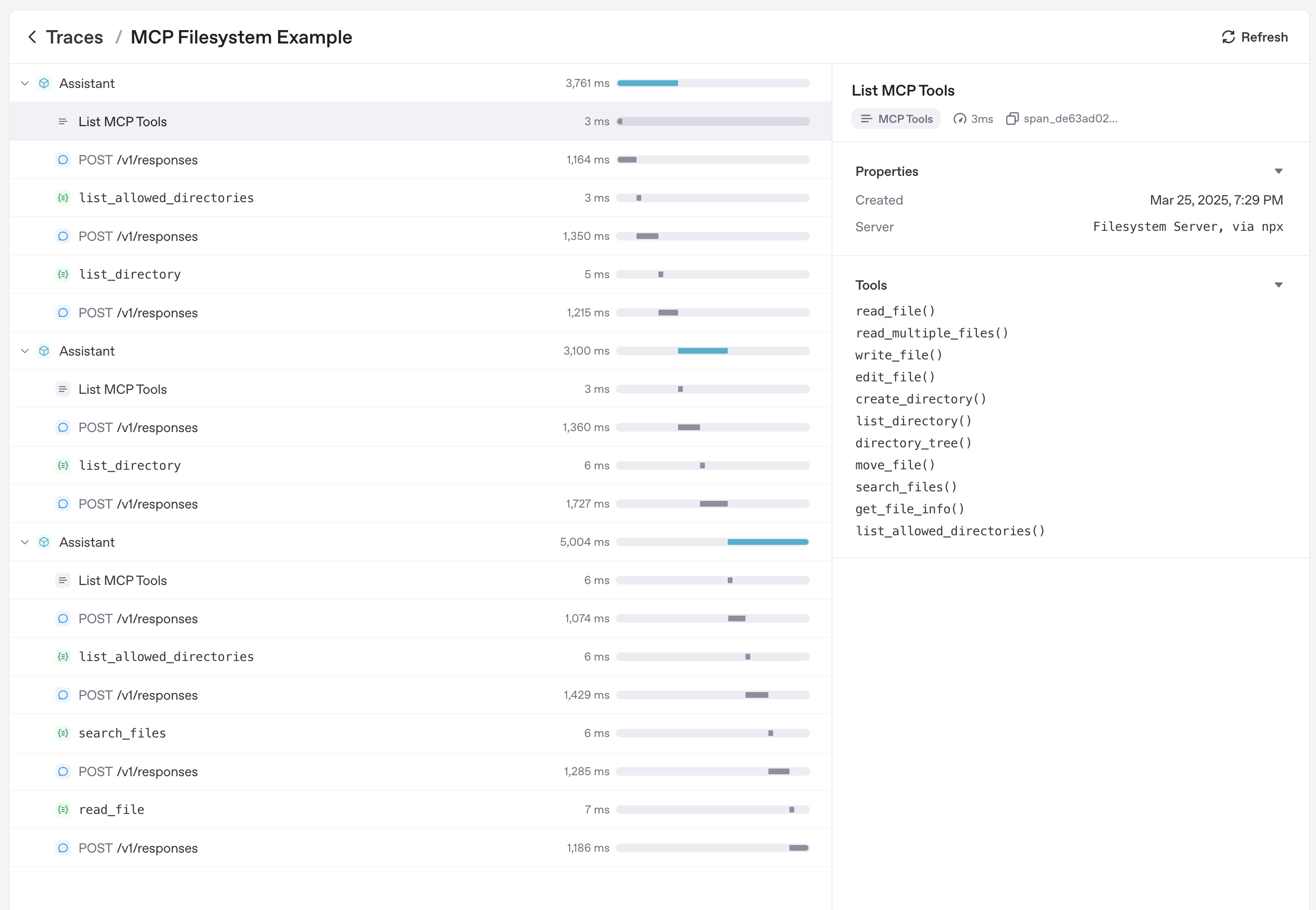
트레이싱
트레이싱은 다음을 포함한 MCP 활동을 자동으로 캡처합니다.
- 도구 목록을 가져오기 위한 MCP 서버 호출
- 도구 호출의 MCP 관련 정보
추가 자료
- Model Context Protocol – 사양 및 설계 가이드
- examples/mcp – 실행 가능한 stdio, SSE, Streamable HTTP 샘플
- examples/hosted_mcp – 승인 및 커넥터를 포함한 전체 호스티드 MCP 데모