Model context protocol (MCP)
Model context protocol(MCP)对应用程序向语言模型公开工具和 上下文的方式进行了标准化。以下引自官方文档:
MCP 是一种开放协议,用于标准化应用程序向 LLM 提供上下文的方式。可以把 MCP 想象成 AI 应用程序的 USB-C 端口。正如 USB-C 提供了一种标准化方式,让设备能够连接到各种外设和配件,MCP 也提供了一种标准化方式,让 AI 模型能够连接到不同的数据源和工具。
Agents Python SDK 支持多种 MCP 传输方式。因此,你可以复用现有的 MCP 服务器,也可以自行构建服务器,向智能体公开由文件系统、HTTP 或连接器支持的工具。
连接前请信任 MCP 服务器
MCP 工具可以公开模型上下文中的数据,并使用你提供的凭据执行操作。请仅连接到你信任的服务器,使用最小权限凭据,将访问令牌放在授权字段或标头中而非 URL 中,并要求对敏感操作进行批准。请参阅 OpenAI MCP 安全指南。
MCP 集成方案选择
在将 MCP 服务器接入智能体之前,请确定工具调用应在何处执行,以及你可以访问哪些传输方式。下表概述了 Python SDK 支持的方案。
| 你的需求 | 推荐方案 |
|---|---|
| 让OpenAI的 Responses API 代表模型调用可公开访问的 MCP 服务器 | 通过 HostedMCPTool 使用托管式 MCP 服务器工具 |
| 连接到你在本地或远程运行的可流式传输 HTTP 服务器 | 通过 MCPServerStreamableHttp 使用可流式传输 HTTP MCP 服务器 |
| 与实现了采用服务器发送事件的 HTTP 的服务器通信 | 通过 MCPServerSse 使用采用 SSE 的 HTTP MCP 服务器 |
| 启动本地进程并通过 stdin/stdout 通信 | 通过 MCPServerStdio 使用 stdio MCP 服务器 |
以下各节将逐一介绍每种方案、配置方法,以及何时应优先选择某种传输方式。
MCP Python SDK v1 与 v2
Agents SDK 通过依赖范围 mcp>=1.19.0,<3 支持 mcp Python 软件包的两个主要版本。已安装的 mcp 软件包版本与同服务器协商的 MCP 协议版本彼此独立。Agents SDK 会检测已安装软件包的主版本,并自动适配 stdio、SSE 和可流式传输 HTTP 连接,因此常规服务器配置无需设置版本开关。
安装 MCP Python SDK v2 后,Agents SDK 会围绕已配置的本地传输方式,使用 mode="auto" 创建 v2 的 mcp.Client。客户端首先会以已安装 MCP SDK 支持的最新协议版本发送 server/discover 探测请求。现代服务器会响应此探测请求,客户端随后采用响应结果。如果旧版服务器不支持 server/discover,客户端会回退到旧版 initialize 握手,并使用该握手协商得到的协议版本。因此,安装 MCP Python SDK v2 并不会强制所有连接使用最新的 MCP 协议版本。请参阅 MCP Python SDK 的协议版本协商指南。
大多数应用程序应让依赖解析器选择兼容版本。如果你的应用程序必须固定使用某个主版本,请在 openai-agents 旁添加明确的约束:
HTTP 传输自定义必须使用已安装 MCP 软件包所采用的 HTTP 技术栈:
| 自定义项 | MCP Python SDK v1 | MCP Python SDK v2 |
|---|---|---|
params["auth"] |
httpx.Auth |
httpx2.Auth |
params["httpx_client_factory"] 返回值 |
httpx.AsyncClient |
httpx2.AsyncClient |
MCPServerStreamableHttp params["ignore_initialized_notification_failure"] = True |
支持 | 不支持;连接前会被拒绝 |
应尽可能使用 Authorization 标头,如下方可流式传输 HTTP 代码示例所示;Authorization 标头可在两个软件包版本中保持不变。当应用程序提供 params["auth"] 或 params["httpx_client_factory"] 时,这些值必须使用已安装 mcp 软件包主版本对应的 HTTP 类型。当应用程序设置 MCPServerStreamableHttp 的 params["ignore_initialized_notification_failure"] = True 时,应用程序必须保留 mcp<2,或在升级前禁用该选项。
这些本地 mcp 依赖要求不适用于 HostedMCPTool,因为远程 MCP 连接由OpenAI Responses API 管理。
智能体级 MCP 配置
除了选择传输方式之外,你还可以通过设置 Agent.mcp_config 来调整 MCP 工具的准备方式。
from agents import Agent

agent = Agent(
    name="Assistant",
    mcp_servers=[server],
    mcp_config={
        # Try to convert MCP tool schemas to strict JSON schema.
        "convert_schemas_to_strict": True,
        # If None, MCP tool failures are raised as exceptions instead of
        # returning model-visible error text.
        "failure_error_function": None,
        # Prefix local MCP tool names with their server name.
        "include_server_in_tool_names": True,
    },
)
注意:
convert_schemas_to_strict采用尽力而为的方式。如果无法转换某个模式,将使用原始模式。failure_error_function控制如何向模型呈现 MCP 工具调用失败。- 未设置
failure_error_function时,SDK 会使用默认的工具错误格式化程序。 - 服务器级
failure_error_function会覆盖该服务器的Agent.mcp_config["failure_error_function"]。 include_server_in_tool_names需要主动启用。启用后,每个本地 MCP 工具都会使用带有确定性服务器前缀的名称向模型公开,这有助于避免多个 MCP 服务器发布同名工具时发生冲突。生成的名称可安全用于 ASCII,并且不会超出FunctionTool实例的名称长度限制,也不会与同一智能体上本地FunctionTool实例的已配置名称或已启用任务转移发生冲突。SDK 仍会在原始服务器上调用原始 MCP 工具名称。
跨传输方式的通用模式
选择传输方式后,大多数集成还需要作出相同的后续决定:
对于本地 MCP 服务器(MCPServerStdio、MCPServerSse、MCPServerStreamableHttp),批准策略和按调用提供的 _meta 载荷也是通用概念。可流式传输 HTTP 一节提供了最完整的代码示例,相同模式也适用于其他本地传输方式。
1. 托管式 MCP 服务器工具
托管式工具会将整个工具往返过程交由OpenAI基础设施处理。你的代码无需列出和调用工具,HostedMCPTool 会将服务器标签(以及可选的连接器元数据)转发到 Responses API。模型会列出远程服务器的工具并调用它们,无需额外回调你的 Python 进程。托管式工具目前适用于支持 Responses API 托管式 MCP 集成的OpenAI模型。
基础托管式 MCP 工具
将 HostedMCPTool 添加到智能体的 tools 列表中,即可创建托管式工具。tool_config
字典与发送到 REST API 的 JSON 对应:
import asyncio

from agents import Agent, HostedMCPTool, Runner

async def main() -> None:
    agent = Agent(
        name="Assistant",
        instructions="Use the DeepWiki hosted MCP server to inspect openai/openai-agents-python.",
        tools=[
            HostedMCPTool(
                tool_config={
                    "type": "mcp",
                    "server_label": "deepwiki",
                    "server_url": "https://mcp.deepwiki.com/mcp",
                    "require_approval": "never",
                }
            )
        ],
    )

    result = await Runner.run(
        agent,
        "Which language is the repository openai/openai-agents-python written in?",
    )
    print(result.final_output)

asyncio.run(main())
托管式服务器会自动公开其工具;无需将其添加到 mcp_servers。
如果希望托管式工具搜索以惰性方式加载托管式 MCP 服务器,请设置 tool_config["defer_loading"] = True,并将 ToolSearchTool 添加到智能体。此功能仅支持 OpenAI Responses 模型。有关完整的工具搜索设置和限制,请参阅工具。
托管式 MCP 结果的流式传输
托管式工具支持流式传输结果,方式与函数工具完全相同。使用 Runner.run_streamed
可在模型仍在工作时接收增量 MCP 输出:
result = Runner.run_streamed(agent, "Summarise this repository's top languages")
async for event in result.stream_events():
    if event.type == "run_item_stream_event":
        print(f"Received: {event.item}")
print(result.final_output)
可选批准流程
如果服务器能够执行敏感操作,你可以要求在每次工具执行前进行人工或程序化批准。在 tool_config 中配置 require_approval,其值可以是单一策略("always"、"never"),也可以是将工具名称映射到策略的字典。若要在 Python 中作出决定,请提供 on_approval_request 回调。
from agents import MCPToolApprovalFunctionResult, MCPToolApprovalRequest

SAFE_TOOLS = {"read_wiki_structure", "read_wiki_contents", "ask_question"}

def approve_tool(request: MCPToolApprovalRequest) -> MCPToolApprovalFunctionResult:
    if request.data.name in SAFE_TOOLS:
        return {"approve": True}
    return {"approve": False, "reason": "Escalate to a human reviewer"}

agent = Agent(
    name="Assistant",
    tools=[
        HostedMCPTool(
            tool_config={
                "type": "mcp",
                "server_label": "deepwiki",
                "server_url": "https://mcp.deepwiki.com/mcp",
                "require_approval": "always",
            },
            on_approval_request=approve_tool,
        )
    ],
)
该回调可以是同步或异步的,只要模型需要批准数据以继续运行,就会调用它。
由连接器支持的托管式服务器
托管式 MCP 还支持OpenAI连接器。无需指定 server_url,而是提供 connector_id 和访问令牌。Responses API 会处理身份验证,托管式服务器则会公开连接器的工具。
import os

HostedMCPTool(
    tool_config={
        "type": "mcp",
        "server_label": "google_calendar",
        "connector_id": "connector_googlecalendar",
        "authorization": os.environ["GOOGLE_CALENDAR_AUTHORIZATION"],
        "require_approval": "never",
    }
)
完整可运行的托管式工具代码示例(包括流式传输、批准和连接器)位于 examples/hosted_mcp。
2. 可流式传输 HTTP MCP 服务器
如果希望自行管理网络连接,请使用 MCPServerStreamableHttp。当你需要控制传输方式,或希望在自己的基础设施中运行服务器并保持低延迟时,可流式传输 HTTP 服务器是理想选择。
import asyncio
import os

from agents import Agent, Runner
from agents.mcp import MCPServerStreamableHttp
from agents.model_settings import ModelSettings

async def main() -> None:
    token = os.environ["MCP_SERVER_TOKEN"]
    async with MCPServerStreamableHttp(
        name="Streamable HTTP Python Server",
        params={
            "url": "http://localhost:8000/mcp",
            "headers": {"Authorization": f"Bearer {token}"},
            "timeout": 10,
        },
        cache_tools_list=True,
        max_retry_attempts=3,
    ) as server:
        agent = Agent(
            name="Assistant",
            instructions="Use the MCP tools to answer the questions.",
            mcp_servers=[server],
            model_settings=ModelSettings(tool_choice="required"),
        )

        result = await Runner.run(agent, "Add 7 and 22.")
        print(result.final_output)

asyncio.run(main())
构造函数还接受以下选项:
client_session_timeout_seconds控制 MCP ClientSession 的读取超时。可由datetime.timedelta表示且至少为一微秒的正有限值会设置有限超时;None和0会禁用超时。构造服务器时会拒绝其他值。use_structured_content控制是否优先使用tool_result.structured_content,而不是文本输出。max_retry_attempts和retry_backoff_seconds_base为list_tools()和call_tool()添加自动重试。tool_filter允许你仅公开部分工具(请参阅工具筛选)。require_approval为本地 MCP 工具启用人在回路批准策略。failure_error_function可自定义模型可见的 MCP 工具失败消息;将其设置为None可改为抛出错误。tool_meta_resolver会在call_tool()之前注入按调用提供的 MCP_meta载荷。
本地 MCP 服务器的批准策略
MCPServerStdio、MCPServerSse 和 MCPServerStreamableHttp 均接受 require_approval。
支持的形式:
- 对所有工具使用
"always"或"never"。 True要求所有工具都经过批准,而False不要求任何工具经过批准(分别等同于"always"和"never")。- 按工具配置的映射,例如
{"delete_file": "always", "read_file": "never"}。 - 分组对象:
{"always": {"tool_names": [...]}, "never": {"tool_names": [...]}}。
async with MCPServerStreamableHttp(
    name="Filesystem MCP",
    params={"url": "http://localhost:8000/mcp"},
    require_approval={"always": {"tool_names": ["delete_file"]}},
) as server:
    ...
有关完整的暂停/恢复流程,请参阅人在回路和 examples/mcp/get_all_mcp_tools_example/main.py。
使用 tool_meta_resolver 提供按调用元数据
当 MCP 服务器期望在 _meta 中接收请求元数据(例如租户 ID 或追踪上下文)时,请使用 tool_meta_resolver。以下代码示例假定你将 dict 作为 context 传递给 Runner.run(...)。
from agents.mcp import MCPServerStreamableHttp, MCPToolMetaContext


def resolve_meta(context: MCPToolMetaContext) -> dict[str, str] | None:
    run_context_data = context.run_context.context or {}
    tenant_id = run_context_data.get("tenant_id")
    if tenant_id is None:
        return None
    return {"tenant_id": str(tenant_id), "source": "agents-sdk"}


server = MCPServerStreamableHttp(
    name="Metadata-aware MCP",
    params={"url": "http://localhost:8000/mcp"},
    tool_meta_resolver=resolve_meta,
)
如果运行上下文是 Pydantic 模型、数据类或自定义类,请改用属性访问来读取租户 ID。
MCP 工具输出:文本、图像及其他内容
当 MCP 结果使用其内容块时,SDK 会将文本内容作为文本输出转发,并将图像内容映射为工具输出中的图像类型条目。对于其他 MCP 内容块类型(包括音频块和资源块),SDK 会转发文本输出,其值为该块的有效 JSON 序列化结果。包含多个内容块的响应会作为输出项列表转发。如果 use_structured_content=True 选择了非空且非错误的 structuredContent 载荷,则该结构化载荷优先于这些内容块。结构化内容缺失或为空时,会回退到内容块。
3. 采用 SSE 的 HTTP MCP 服务器
Warning
MCP 项目已弃用服务器发送事件传输方式。对于新集成,请优先使用可流式传输 HTTP 或 stdio,仅为旧版服务器保留 SSE。
如果 MCP 服务器实现了采用 SSE 的 HTTP 传输,请实例化 MCPServerSse。除传输方式外,其 API 与可流式传输 HTTP 服务器完全相同。
from agents import Agent, Runner
from agents.model_settings import ModelSettings
from agents.mcp import MCPServerSse

workspace_id = "demo-workspace"

async with MCPServerSse(
    name="SSE Python Server",
    params={
        "url": "http://localhost:8000/sse",
        "headers": {"X-Workspace": workspace_id},
    },
    cache_tools_list=True,
) as server:
    agent = Agent(
        name="Assistant",
        mcp_servers=[server],
        model_settings=ModelSettings(tool_choice="required"),
    )
    result = await Runner.run(agent, "What's the weather in Tokyo?")
    print(result.final_output)
4. stdio MCP 服务器
对于作为本地子进程运行的 MCP 服务器,请使用 MCPServerStdio。SDK 会启动该进程、保持管道打开,并在上下文管理器退出时自动关闭管道。此方案有助于快速构建概念验证,或适用于服务器仅公开命令行入口点的情况。
from pathlib import Path
from agents import Agent, Runner
from agents.mcp import MCPServerStdio

current_dir = Path(__file__).parent
samples_dir = current_dir / "sample_files"

async with MCPServerStdio(
    name="Filesystem Server via npx",
    params={
        "command": "npx",
        "args": ["-y", "@modelcontextprotocol/server-filesystem", str(samples_dir)],
    },
) as server:
    agent = Agent(
        name="Assistant",
        instructions="Use the files in the sample directory to answer questions.",
        mcp_servers=[server],
    )
    result = await Runner.run(agent, "List the files available to you.")
    print(result.final_output)
5. MCP 服务器管理器
如果有多个 MCP 服务器,请使用 MCPServerManager 预先连接它们,并向智能体公开其中成功连接的服务器子集。有关构造函数选项和重新连接行为,请参阅 MCPServerManager API 参考。
from agents import Agent, Runner
from agents.mcp import MCPServerManager, MCPServerStreamableHttp

servers = [
    MCPServerStreamableHttp(name="calendar", params={"url": "http://localhost:8000/mcp"}),
    MCPServerStreamableHttp(name="docs", params={"url": "http://localhost:8001/mcp"}),
]

async with MCPServerManager(servers) as manager:
    agent = Agent(
        name="Assistant",
        instructions="Use MCP tools when they help.",
        mcp_servers=manager.active_servers,
    )
    result = await Runner.run(agent, "Which MCP tools are available?")
    print(result.final_output)
关键行为:
- 当
drop_failed_servers=True(默认值)时,active_servers仅包含成功连接的服务器。 - 如果输入可迭代对象重复包含同一服务器对象,管理器只会管理该服务器一次:
all_servers和active_servers均只包含一个条目,并且该服务器只会执行一次连接和清理。 - 失败会记录在
failed_servers和errors中。 - 设置
strict=True可在首次连接失败时抛出异常。 - 调用
reconnect(failed_only=True)可重试失败的服务器,调用reconnect(failed_only=False)可重启所有服务器。 - 对
connect_all()、reconnect()和cleanup_all()的调用会被串行处理。如果已有一个生命周期操作正在运行,另一个生命周期操作会等待其完成,而不会并发连接或清理相同的服务器。 - 设置
connect_timeout_seconds、cleanup_timeout_seconds和connect_in_parallel可调整生命周期行为。两个生命周期超时均默认为 10 秒。它们接受正有限秒数,也接受None以禁用超时,并且会在构造和赋值期间进行验证;零会被拒绝,因为它会产生立即到期的截止时间。
通用服务器能力
以下各节适用于各种 MCP 服务器传输方式(具体 API 范围取决于服务器类)。
工具筛选
每个 MCP 服务器都支持工具筛选器,以便你仅公开智能体所需的函数。筛选可以在构造时进行,也可以在每次运行时动态进行。
静态工具筛选
使用 create_static_tool_filter 配置简单的允许列表和阻止列表:
from pathlib import Path

from agents.mcp import MCPServerStdio, create_static_tool_filter

samples_dir = Path("/path/to/files")

filesystem_server = MCPServerStdio(
    params={
        "command": "npx",
        "args": ["-y", "@modelcontextprotocol/server-filesystem", str(samples_dir)],
    },
    tool_filter=create_static_tool_filter(allowed_tool_names=["read_file", "write_file"]),
)
同时提供 allowed_tool_names 和 blocked_tool_names 时,SDK 会先应用允许列表,然后从剩余集合中移除所有被阻止的工具。
动态工具筛选
对于更复杂的逻辑,请传入一个接收 ToolFilterContext 的可调用对象。该可调用对象可以是同步或异步的,并在应公开工具时返回 True。
from pathlib import Path

from agents.mcp import MCPServerStdio, ToolFilterContext

samples_dir = Path("/path/to/files")

async def context_aware_filter(context: ToolFilterContext, tool) -> bool:
    if context.agent.name == "Code Reviewer" and tool.name.startswith("danger_"):
        return False
    return True

async with MCPServerStdio(
    params={
        "command": "npx",
        "args": ["-y", "@modelcontextprotocol/server-filesystem", str(samples_dir)],
    },
    tool_filter=context_aware_filter,
) as server:
    ...
筛选器上下文会公开活动的 run_context、请求这些工具的 agent,以及 server_name。
工具安全防护措施
本地 MCP 服务器类接受 tool_input_guardrails 和 tool_output_guardrails。SDK 会将这些服务器范围的安全防护措施附加到筛选后保留的每个 MCP 工具。输入安全防护措施可以阻止 MCP 服务器调用并提供替代内容,而输出安全防护措施会在 SDK 将转换后的 MCP 结果发回模型前对其进行检查。这些安全防护措施使用工具安全防护措施中所述的相同函数工具执行管道、批准顺序、结果追踪和触发器异常。
import json

from agents import ToolGuardrailFunctionOutput
from agents.decorators import tool_input_guardrail
from agents.mcp import MCPServerStdio


@tool_input_guardrail
def block_secret_arguments(data):
    arguments = json.loads(data.context.tool_arguments or "{}")
    if "secret" in arguments:
        return ToolGuardrailFunctionOutput.reject_content(
            "Remove secrets before calling this MCP tool."
        )
    return ToolGuardrailFunctionOutput.allow()


filesystem_server = MCPServerStdio(
    params={
        "command": "npx",
        "args": ["-y", "@modelcontextprotocol/server-filesystem", "."],
    },
    tool_input_guardrails=[block_secret_arguments],
)
此配置仅适用于由 MCPServerStdio、MCPServerSse 和 MCPServerStreamableHttp 等本地 MCP 服务器对象公开的工具。它不会向 HostedMCPTool 添加客户端工具安全防护措施,因为 Responses API 会将其作为托管式工具执行。
提示词
MCP 服务器还可以提供用于动态生成智能体指令的提示词。支持提示词的服务器会公开两种 方法:
list_prompts()枚举可用的提示词模板。get_prompt(name, arguments)获取具体提示词,并可选择提供参数。
from agents import Agent

prompt_result = await server.get_prompt(
    "generate_code_review_instructions",
    {"focus": "security vulnerabilities", "language": "python"},
)
instructions = prompt_result.messages[0].content.text

agent = Agent(
    name="Code Reviewer",
    instructions=instructions,
    mcp_servers=[server],
)
分页
内置本地 MCP 服务器类会在列出工具和提示词时自动跟随 nextCursor。list_tools() 会在应用筛选器或填充缓存前收集完整的工具列表,而 list_prompts() 会返回一个合并结果,其中 nextCursor=None。如果后续页面失败或服务器重复返回某个游标,该操作会抛出错误,而不会公开或缓存部分结果。
资源仍需显式分页。将 list_resources() 或 list_resource_templates() 返回的 nextCursor 作为 cursor 参数传回,以获取下一页。
缓存
每次智能体运行都会对每个 MCP 服务器调用 list_tools()。远程服务器可能会引入明显延迟,因此所有 MCP 服务器类都公开了 cache_tools_list 选项。只有在确信工具定义不会频繁变化时,才应将其设置为 True。若要稍后强制获取最新列表,请在服务器实例上调用 invalidate_tools_cache()。
启用缓存后,每个 list_tools() 结果都包含缓存工具定义的分离副本,其中包括嵌套输入模式。动态工具筛选回调也会检查分离副本。因此,修改返回的工具或筛选器接收的工具,不会更改服务器缓存的模式或后续 list_tools() 结果。
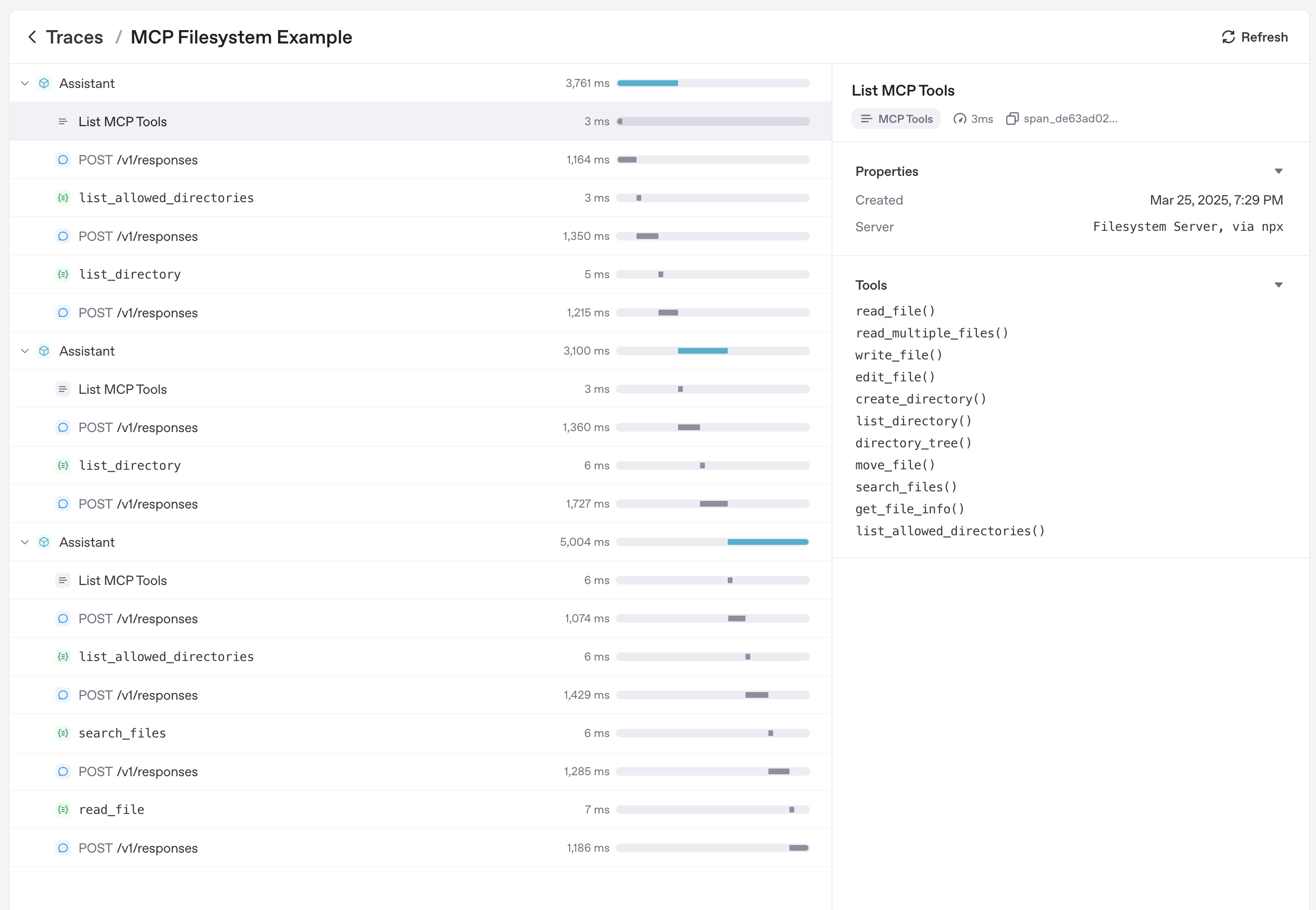
追踪
追踪会自动捕获 MCP 活动,包括:
- 为列出工具而对 MCP 服务器进行的调用。
- 工具调用中与 MCP 相关的信息。
延伸阅读
- Model Context Protocol – 规范和设计指南。
- examples/mcp – 可运行的 stdio、SSE 和可流式传输 HTTP 代码示例。
- examples/hosted_mcp – 完整的托管式 MCP 演示,包括批准和连接器。