Concepts
Modern agents work best when they can operate on real files in a filesystem. Sandbox Agents can make use of specialized tools and shell commands to search over and manipulate large document sets, edit files, generate artifacts, and run commands. The sandbox provides the model with a persistent workspace that the agent can use to do work on your behalf. Sandbox Agents in the Agents SDK help you easily run agents paired with a sandbox environment, making it easy to get the right files on the filesystem and orchestrate the sandboxes to make it easy to start, stop, and resume tasks at scale.
You define the workspace around the data the agent needs. It can start from GitHub repos, local files and directories, synthetic task files, remote filesystems such as S3 or Azure Blob Storage, and other sandbox inputs you provide.
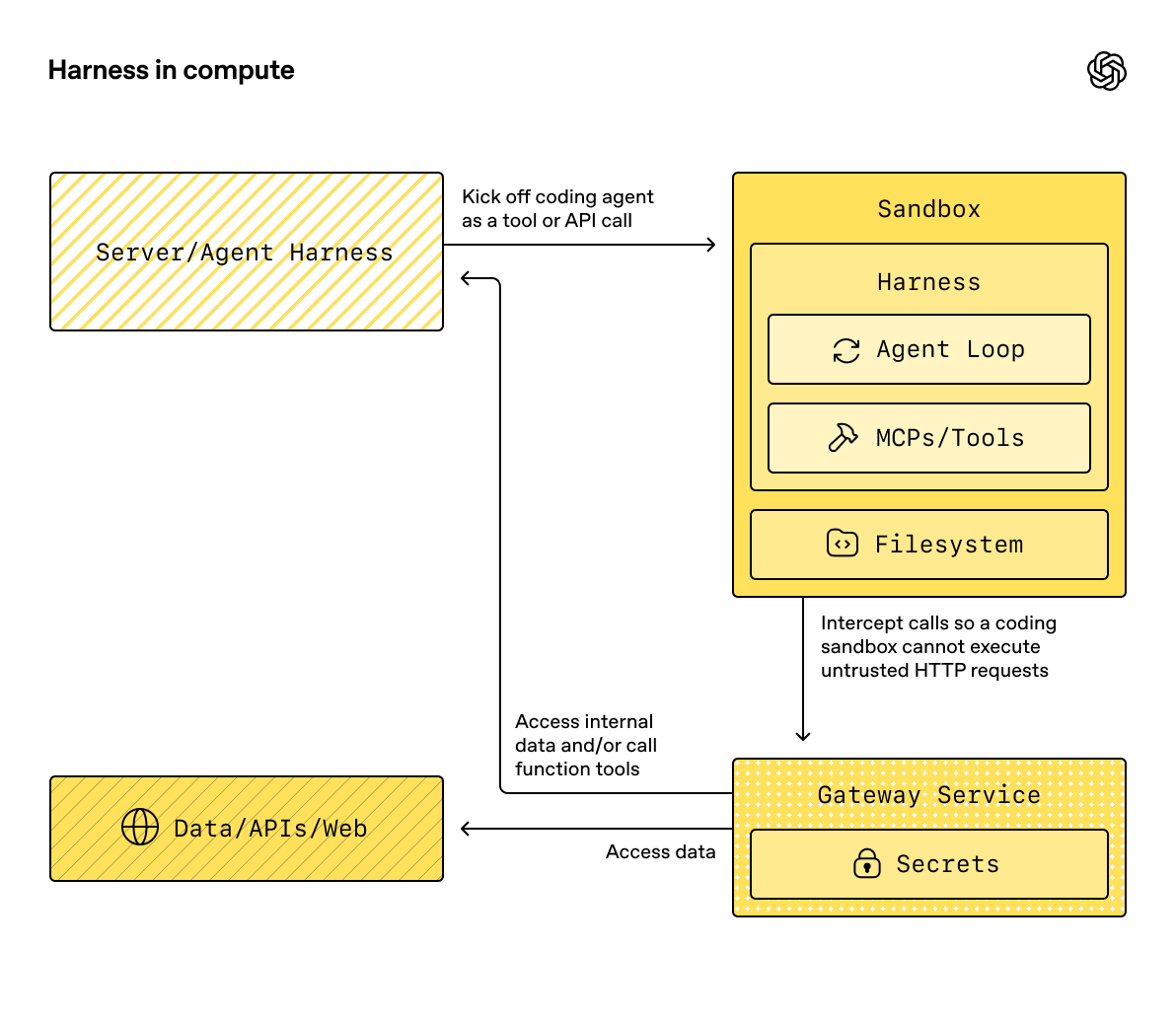
SandboxAgent is still an Agent. It keeps the usual agent surface such as instructions, prompt, tools, handoffs, mcp_servers, model_settings, output_type, guardrails, and hooks, and it still runs through the normal Runner APIs. What changes is the execution boundary:
SandboxAgentdefines the agent itself: the usual agent configuration plus sandbox-specific defaults likedefault_manifest,base_instructions,run_as, and capabilities such as filesystem tools, shell access, skills, memory, or compaction.Manifestdeclares the desired starting contents and layout for a fresh sandbox workspace, including files, repos, mounts, and environment.- A sandbox session is the live execution environment where commands run and files change. The isolation provided by a session depends on its backend and configuration.
SandboxRunConfigdecides how the run gets that sandbox session, for example by injecting one directly, reconnecting from serialized sandbox session state, or creating a fresh sandbox session through a sandbox client.- Saved sandbox state and snapshots let later runs reconnect to prior work or seed a fresh sandbox session from saved contents.
Manifest is the fresh-session workspace contract, not the full source of truth for every live sandbox. The effective workspace for a run can instead come from a reused sandbox session, serialized sandbox session state, or a snapshot chosen at run time.
Throughout this page, "sandbox session" means the live execution environment managed by a sandbox client. It is different from the SDK's conversational Session interfaces described in Sessions.
The outer runtime still owns approvals, tracing, handoffs, and tracking the state needed to resume runs. The sandbox session manages commands and file changes through its backend. The backend determines which isolation controls apply; a session does not itself guarantee OS-level confinement.
How the pieces fit together
A sandbox run combines an agent definition with per-run sandbox configuration. The runner prepares the agent, binds it to a live sandbox session, and can save state for later runs.
flowchart LR
    agent["SandboxAgent<br/><small>full Agent + sandbox defaults</small>"]
    config["SandboxRunConfig<br/><small>client / session / resume inputs</small>"]
    runner["Runner<br/><small>prepare instructions<br/>bind capability tools</small>"]
    sandbox["sandbox session<br/><small>workspace where commands run<br/>and files change</small>"]
    saved["saved state / snapshot<br/><small>for resume or fresh-start later</small>"]

    agent --> runner
    config --> runner
    runner --> sandbox
    sandbox --> saved
Sandbox-specific defaults stay on SandboxAgent. Per-run sandbox-session choices stay in SandboxRunConfig.
Think about the lifecycle in three phases:
- Define the agent and the fresh-workspace contract with
SandboxAgent,Manifest, and capabilities. - Execute a run by giving
RunneraSandboxRunConfigthat injects, resumes, or creates the sandbox session. - Continue later from runner-managed
RunState, explicit sandboxsession_state, or a saved workspace snapshot.
If shell access is just one tool that you use occasionally, start with hosted shell in the tools guide. Reach for sandbox agents when workspace isolation, sandbox client choice, or sandbox-session resume behavior are part of the design.
When to use them
Sandbox agents are a good fit for workspace-centric workflows, for example:
- coding and debugging, for example orchestrating automated fixes for issue reports in a GitHub repo and running targeted tests
- document processing and editing, for example extracting information from a user's financial documents and creating a completed tax-form draft
- file-grounded review or analysis, for example checking onboarding packets, generated reports, or artifact bundles before answering
- multi-agent patterns with separate workspaces, for example giving each reviewer or coding sub-agent its own workspace
- multi-step workspace tasks, for example fixing a bug in one run and adding a regression test later, or resuming from snapshot or sandbox session state
If you do not need access to files or a stateful, mutable filesystem, keep using Agent. If shell access is just one occasional capability, add hosted shell; if the workspace boundary itself is part of the feature, use sandbox agents.
Choose a sandbox client
Use UnixLocalSandboxClient for trusted local development on macOS or Linux, or within an externally isolated environment. On Linux, this backend runs commands as host processes without adding OS-level confinement. On macOS, it applies filesystem restrictions through sandbox-exec, but does not provide network isolation.
By default, new Unix-local sessions receive separate temporary workspaces. If you configure sessions with the same custom Manifest.root, those sessions share the workspace. Separate sessions do not guarantee OS-level isolation.
For untrusted commands, including commands influenced by untrusted inputs, choose an appropriately configured DockerSandboxClient or hosted provider, or supply external isolation. On Windows, use Docker or a hosted provider. See Unix-local execution limits before choosing a local backend.
In most cases, the SandboxAgent definition stays the same while the sandbox client and its options change in SandboxRunConfig. See Sandbox clients for local, Docker, hosted, and remote-mount options.
Core pieces
| Layer | Main SDK pieces | What it answers |
|---|---|---|
| Agent definition | SandboxAgent, Manifest, capabilities |
What agent will run, and what fresh-session workspace contract should it start from? |
| Sandbox execution | SandboxRunConfig, the sandbox client, and the live sandbox session |
How does this run get a live sandbox session, and where does the work execute? |
| Saved sandbox state | RunState sandbox payload, session_state, and snapshots |
How does this workflow reconnect to prior sandbox work or seed a fresh sandbox session from saved contents? |
The main SDK pieces map onto those layers like this:
| Piece | What it owns | Ask this question |
|---|---|---|
SandboxAgent |
The agent definition | What should this agent do, and which defaults should travel with it? |
Manifest |
Fresh-session workspace files and folders | What files and folders should be present on the filesystem when the run starts? |
Capability |
Sandbox-native behavior | Which tools, instruction fragments, or runtime behavior should attach to this agent? |
SandboxRunConfig |
Per-run sandbox client and sandbox-session source | Should this run inject, resume, or create a sandbox session? |
RunState |
Runner-managed saved sandbox state | Am I resuming a prior runner-managed workflow and carrying its sandbox state forward automatically? |
SandboxRunConfig.session_state |
Explicit serialized sandbox session state | Do I want to resume from sandbox state I already serialized outside RunState? |
SandboxRunConfig.snapshot |
Saved workspace contents for fresh sandbox sessions | Should a new sandbox session start from saved files and artifacts? |
A practical design order is:
- Define the fresh-session workspace contract with
Manifest. - Define the agent with
SandboxAgent. - Add built-in or custom capabilities.
- Decide how each run should obtain its sandbox session in
RunConfig(sandbox=SandboxRunConfig(...)).
How a sandbox run is prepared
At run time, the runner turns that definition into a concrete sandbox-backed run:
- It resolves the sandbox session from
SandboxRunConfig. If you passsession=..., it reuses that live sandbox session. Otherwise it usesclient=...to create or resume one. - It determines the effective workspace inputs for the run. If the run injects or resumes a sandbox session, that existing sandbox state wins. Otherwise the runner starts from a one-off manifest override or
agent.default_manifest. This is whyManifestalone does not define the final live workspace for every run. - It lets capabilities process the resulting manifest. This is how capabilities can add files, mounts, or other workspace-scoped behavior before the final agent is prepared.
- It builds the final instructions in a fixed order: the SDK's default sandbox prompt, or
base_instructionsif you explicitly override it, theninstructions, then capability instruction fragments, then any remote-mount policy text, then a rendered filesystem tree. - It binds capability tools to the live sandbox session and runs the prepared agent through the normal
RunnerAPIs.
Sandboxing does not change what a turn means. A turn is still a model step, not a single shell command or sandbox action. There is no fixed 1:1 mapping between sandbox-side operations and turns: some work may stay inside the sandbox execution layer, while other actions return information that requires another model step, such as a tool result, an approval, or another kind of state. As a practical rule, another turn is consumed only when the agent runtime needs another model response after sandbox work has happened.
Those preparation steps are why default_manifest, instructions, base_instructions, capabilities, and run_as are the main sandbox-specific options to think about when designing a SandboxAgent.
SandboxAgent options
These are the sandbox-specific options on top of the usual Agent fields:
| Option | Best use |
|---|---|
default_manifest |
The default workspace for fresh sandbox sessions created by the runner. |
instructions |
Additional role, workflow, and success criteria appended after the SDK sandbox prompt. |
base_instructions |
Advanced escape hatch that replaces the SDK sandbox prompt. |
capabilities |
Sandbox-native tools and behavior that should travel with this agent. |
run_as |
User identity for model-facing sandbox tools such as shell commands, file reads, and patches. |
Sandbox client choice, sandbox-session reuse, manifest override, and snapshot selection belong in SandboxRunConfig, not on the agent.
default_manifest
default_manifest is the default Manifest used when the runner creates a fresh sandbox session for this agent. Use it for the files, repos, helper material, output directories, and mounts the agent should usually start with.
This is only the default. A run can override it with SandboxRunConfig(manifest=...), and a reused or resumed sandbox session keeps its existing workspace state.
instructions and base_instructions
Use instructions for short rules that should survive different prompts. In a SandboxAgent, these instructions are appended after the SDK's sandbox base prompt, so you keep the built-in sandbox guidance and add your own role, workflow, and success criteria.
Use base_instructions only when you want to replace the SDK sandbox base prompt. Most agents should not set it.
| Put it in... | Use it for | Examples |
|---|---|---|
instructions |
Stable role, workflow rules, and success criteria for the agent. | "Inspect onboarding documents, then hand off.", "Write final files into output/." |
base_instructions |
A full replacement for the SDK sandbox base prompt. | Custom low-level sandbox wrapper prompts. |
| the user prompt | The one-off request for this run. | "Summarize this workspace." |
| workspace files in the manifest | Longer task specs, repo-local instructions, or bounded reference material. | repo/task.md, document bundles, sample packets. |
Good uses for instructions include:
- examples/sandbox/unix_local_pty.py keeps the agent in one interactive process when PTY state matters.
- examples/sandbox/handoffs.py forbids the sandbox reviewer from answering the user directly after inspection.
- examples/sandbox/tax_prep.py requires the final filled files to actually land in
output/. - examples/sandbox/docs/coding_task.py pins the exact verification command and clarifies that patch paths are workspace-root relative when
SandboxRunConfig.cwdis unset.
Avoid copying the user's one-off task into instructions, embedding long reference material that belongs in the manifest, restating tool docs that built-in capabilities already inject, or mixing in local installation notes the model does not need at run time.
If you omit instructions, the SDK still includes the default sandbox prompt. That is enough for low-level wrappers, but most user-facing agents should still provide explicit instructions.
capabilities
Capabilities attach sandbox-native behavior to a SandboxAgent. They can shape the workspace before a run starts, append sandbox-specific instructions, expose tools that bind to the live sandbox session, and adjust model behavior or input handling for that agent.
Built-in capabilities include:
| Capability | Add it when | Notes |
|---|---|---|
Shell |
The agent needs shell access. | Adds exec_command, plus write_stdin when the sandbox client supports PTY interaction. |
Filesystem |
The agent needs to edit files or inspect local images. | Adds apply_patch and view_image; relative paths use the workspace root by default and SandboxRunConfig.cwd when configured. |
Skills |
You want skill discovery and materialization in the sandbox. | Prefer this over manually mounting .agents or .agents/skills; Skills indexes and materializes skills into the sandbox for you. |
Memory |
Follow-on runs should read or generate memory artifacts. | Requires Shell; updating memory artifacts during a run also requires Filesystem. |
Compaction |
Long-running flows need context trimming after compaction items. | Adjusts model sampling and input handling. |
By default, SandboxAgent.capabilities uses Capabilities.default(), which includes Filesystem(), Shell(), and Compaction(). If you pass capabilities=[...], that list replaces the default, so include any default capabilities you still want.
The view_image tool identifies PNG, JPEG, GIF, WebP, BMP, and TIFF raster images from their file content, not from the filename extension. A filename with a raster-image extension is rejected when its content is unsupported, while supported raster content can be loaded even when the filename has no image extension. For .svg and .svgz files, the tool retains filename-based compatibility in addition to recognizing SVG markup from file content.
For skills, choose the source based on how you want them materialized:
Skills(lazy_from=LocalDirLazySkillSource(...))is a good default for larger local skill directories because the model can discover the index first and load only what it needs.LocalDirLazySkillSource(source=LocalDir(src=...))reads from the filesystem where the SDK process is running. Pass the original host-side skills directory, not a path that only exists inside the sandbox image or workspace.Skills(from_=LocalDir(src=...))is better for a small local bundle you want staged up front.Skills(from_=GitRepo(repo=..., ref=...))is the right fit when the skills themselves should come from a repository.
LocalDir.src is the source path on the SDK host. skills_path is the relative destination path inside the sandbox workspace where skills are staged when load_skill is called.
If your skills already live on disk under something like .agents/skills/<name>/SKILL.md, point LocalDir(...) at that source root and still use Skills(...) to expose them. Keep the default skills_path=".agents" unless you have an existing workspace contract that depends on a different in-sandbox layout.
Prefer built-in capabilities when they fit. Write a custom capability only when you need a sandbox-specific tool or instruction surface that the built-ins do not cover.
Concepts
Manifest
A Manifest describes the workspace for a fresh sandbox session. It can set the workspace root, declare files and directories, copy in local files, clone Git repos, attach remote storage mounts, set environment variables, define users or groups, and grant access to specific absolute paths outside the workspace.
Manifest entry paths are workspace-relative. They cannot be absolute paths or escape the workspace with .., which keeps the workspace contract portable across local, Docker, and hosted clients.
Use manifest entries for the material the agent needs before work begins:
| Manifest entry | Use it for |
|---|---|
File, Dir |
Small synthetic inputs, helper files, or output directories. |
LocalFile, LocalDir |
Host files or directories that should be materialized into the sandbox. |
GitRepo |
A repository that should be fetched into the workspace. |
mounts such as S3Mount, GCSMount, R2Mount, AzureBlobMount, BoxMount, S3FilesMount |
External storage that should appear inside the sandbox. |
GitRepo requires the git executable on PATH inside the sandbox where the repository is materialized. For UnixLocalSandboxClient, install Git on the local machine. For Docker or hosted sandbox clients, include Git in the sandbox image or environment before applying the manifest. Installing the Python SDK does not install Git.
Dir creates a directory inside the sandbox workspace from synthetic children or as an output location; it does not read from the host filesystem. Use LocalDir when an existing host directory should be copied into the sandbox workspace.
LocalFile.src and LocalDir.src are resolved against the SDK process working directory by default. The source must stay under that base directory unless it is covered by extra_path_grants. This keeps local source materialization inside the same host-path trust boundary as the rest of the sandbox manifest.
Mount entries describe what storage to expose; mount strategies describe how a sandbox backend attaches that storage. See Sandbox clients for mount options and provider support.
Good manifest design usually means keeping the workspace contract narrow, putting long task recipes in workspace files such as repo/task.md, and using relative workspace paths in instructions, for example repo/task.md or output/report.md. If the agent edits files with the Filesystem capability's apply_patch tool, remember that patch paths use the sandbox workspace root by default or SandboxRunConfig.cwd when configured; they do not use the shell workdir.
Use extra_path_grants only when the agent needs a concrete absolute path outside the workspace or the manifest needs to copy a trusted local source outside the SDK process working directory. Examples include /tmp for temporary tool output, /opt/toolchain for a read-only runtime, or a generated skills directory that should be materialized into the sandbox. A grant applies to local source materialization and SDK file APIs. It also applies to shell execution when the backend can enforce filesystem policy:
from agents.sandbox import Manifest, SandboxPathGrant

manifest = Manifest(
    extra_path_grants=(
        SandboxPathGrant(path="/tmp"),
        SandboxPathGrant(path="/opt/toolchain", read_only=True),
    ),
)
Set host_path when Docker should bind-mount a different absolute host path at the absolute POSIX path inside the container. UnixLocalSandboxClient supports only path-only grants, where both paths are the same, and rejects host_path. Use read_only=True for host data the sandbox should not modify, or use LocalFile or LocalDir when a copy is sufficient.
Unix-local path grants govern which host sources may be copied into the workspace and which paths SDK file APIs may access. read_only=True prevents SDK file API writes to a granted path. On Linux, these settings do not constrain arbitrary shell commands: a command can access host paths allowed by the process's permissions and any external isolation, even when those paths have no grant. The macOS filesystem profile and Docker bind mounts apply their respective grant restrictions to commands.
Treat manifests that contain extra_path_grants as trusted configuration. Do not load grants from model output or other untrusted payloads unless your application has already approved those host paths.
Snapshots and persist_workspace() still include only the workspace root. Extra granted paths are runtime access, not durable workspace state.
Permissions
Permissions controls filesystem permissions for manifest entries. It is about the files the sandbox materializes, not model permissions, approval policy, or API credentials.
By default, manifest entries are owner-readable/writable/executable and readable/executable by group and others. Override this when staged files should be private, read-only, or executable:
from agents.sandbox import FileMode, Permissions
from agents.sandbox.entries import File

private_notes = File(
    content=b"internal notes",
    permissions=Permissions(
        owner=FileMode.READ | FileMode.WRITE,
        group=FileMode.NONE,
        other=FileMode.NONE,
    ),
)
Permissions stores separate owner, group, and other bits, plus whether the entry is a directory. You can build it directly, parse it from a mode string with Permissions.from_str(...), or derive it from an OS mode with Permissions.from_mode(...).
Users are the sandbox identities that can execute work. Add a User to the manifest when you want that identity to exist in the sandbox, then set SandboxAgent.run_as when model-facing sandbox tools such as shell commands, file reads, and patches should run as that user. If run_as points at a user that is not already in the manifest, the runner adds it to the effective manifest for you.
from agents import Runner
from agents.run import RunConfig
from agents.sandbox import FileMode, Manifest, Permissions, SandboxAgent, SandboxRunConfig, User
from agents.sandbox.entries import Dir, LocalDir
from agents.sandbox.sandboxes.unix_local import UnixLocalSandboxClient

analyst = User(name="analyst")

agent = SandboxAgent(
    name="Dataroom analyst",
    instructions="Review the files in `dataroom/` and write findings to `output/`.",
    default_manifest=Manifest(
        # Declare the sandbox user so manifest entries can grant access to it.
        users=[analyst],
        entries={
            "dataroom": LocalDir(
                src="./dataroom",
                # Let the analyst traverse and read the mounted dataroom, but not edit it.
                group=analyst,
                permissions=Permissions(
                    owner=FileMode.READ | FileMode.EXEC,
                    group=FileMode.READ | FileMode.EXEC,
                    other=FileMode.NONE,
                ),
            ),
            "output": Dir(
                # Give the analyst a writable scratch/output directory for artifacts.
                group=analyst,
                permissions=Permissions(
                    owner=FileMode.ALL,
                    group=FileMode.ALL,
                    other=FileMode.NONE,
                ),
            ),
        },
    ),
    # Run model-facing sandbox actions as this user, so those permissions apply.
    run_as=analyst,
)

result = await Runner.run(
    agent,
    "Summarize the contracts and call out renewal dates.",
    run_config=RunConfig(
        sandbox=SandboxRunConfig(client=UnixLocalSandboxClient()),
    ),
)
If you also need file-level sharing rules, combine users with manifest groups and entry group metadata. The run_as user controls who executes sandbox-native actions; Permissions controls which files that user can read, write, or execute once the sandbox has materialized the workspace.
SnapshotSpec
SnapshotSpec tells a fresh sandbox session where saved workspace contents should be restored from and persisted back to. It is the snapshot policy for the sandbox workspace, while session_state is the serialized connection state for resuming a specific sandbox backend.
Use LocalSnapshotSpec for local durable snapshots and RemoteSnapshotSpec when your app provides a remote snapshot client. A no-op snapshot is used as a fallback when local snapshot setup is unavailable, and advanced callers can use one explicitly when they do not want workspace snapshot persistence.
from pathlib import Path

from agents.run import RunConfig
from agents.sandbox import LocalSnapshotSpec, SandboxRunConfig
from agents.sandbox.sandboxes.unix_local import UnixLocalSandboxClient

run_config = RunConfig(
    sandbox=SandboxRunConfig(
        client=UnixLocalSandboxClient(),
        snapshot=LocalSnapshotSpec(base_path=Path("/tmp/my-sandbox-snapshots")),
    )
)
When the runner creates a fresh sandbox session, the sandbox client builds a snapshot instance for that session. On start, if the snapshot is restorable, the sandbox restores saved workspace contents before the run continues. On cleanup, runner-owned sandbox sessions archive the workspace and persist it back through the snapshot.
If you omit snapshot, the runtime tries to use a default local snapshot location when it can. If that cannot be set up, it falls back to a no-op snapshot. Mounted and ephemeral paths are not copied into snapshots as durable workspace contents.
Sandbox lifecycle
There are two lifecycle modes: SDK-owned and developer-owned.
sequenceDiagram
    participant App
    participant Runner
    participant Client
    participant Sandbox

    App->>Runner: Runner.run(..., SandboxRunConfig(client=...))
    Runner->>Client: create or resume sandbox
    Client-->>Runner: sandbox session
    Runner->>Sandbox: start, run tools
    Runner->>Sandbox: stop and persist snapshot
    Runner->>Client: delete runner-owned resources

    App->>Client: create(...)
    Client-->>App: sandbox session
    App->>Sandbox: async with sandbox
    App->>Runner: Runner.run(..., SandboxRunConfig(session=sandbox))
    Runner->>Sandbox: run tools
    App->>Sandbox: cleanup on context exit / aclose()
Use SDK-owned lifecycle when the sandbox only needs to live for one run. Pass a client, optionally a manifest and snapshot, and any client options you need; the runner creates or resumes the sandbox, starts it, runs the agent, persists snapshot-backed workspace state, ends the sandbox session, and lets the client clean up runner-owned resources.
result = await Runner.run(
    agent,
    "Inspect the workspace and summarize what changed.",
    run_config=RunConfig(
        sandbox=SandboxRunConfig(client=UnixLocalSandboxClient()),
    ),
)
Use developer-owned lifecycle when you want to eagerly create a sandbox, reuse one live sandbox across multiple runs, inspect files after a run, stream over a sandbox you created yourself, or decide exactly when cleanup happens. Passing session=... tells the runner to use that live sandbox, but not to close it for you.
sandbox = await client.create(manifest=agent.default_manifest)

async with sandbox:
    run_config = RunConfig(sandbox=SandboxRunConfig(session=sandbox))
    await Runner.run(agent, "Analyze the files.", run_config=run_config)
    await Runner.run(agent, "Write the final report.", run_config=run_config)
The context manager is the usual shape: it starts the sandbox on entry and runs the session cleanup lifecycle on exit. If your app cannot use a context manager, call the lifecycle methods directly:
sandbox = await client.create(
    manifest=agent.default_manifest,
    snapshot=LocalSnapshotSpec(base_path=Path("/tmp/my-sandbox-snapshots")),
)
try:
    await sandbox.start()
    await Runner.run(
        agent,
        "Analyze the files.",
        run_config=RunConfig(sandbox=SandboxRunConfig(session=sandbox)),
    )
    # Persist a checkpoint of the live workspace before doing more work.
    # `aclose()` also calls `stop()`, so this is only needed for an explicit mid-lifecycle save.
    await sandbox.stop()
finally:
    await sandbox.aclose()
stop() only persists snapshot-backed workspace contents; it does not tear down the sandbox. aclose() is the full session cleanup path: it runs pre-stop hooks, calls stop(), shuts down sandbox resources, and closes session-scoped dependencies.
SandboxRunConfig options
SandboxRunConfig holds the per-run options that decide where the sandbox session comes from and how a fresh session should be initialized.
Sandbox source
These options decide whether the runner should reuse, resume, or create the sandbox session:
| Option | Use it when | Notes |
|---|---|---|
client |
You want the runner to create, resume, and clean up sandbox sessions for you. | Required unless you provide a live sandbox session. |
session |
You already created a live sandbox session yourself. | The caller owns lifecycle; the runner reuses that live sandbox session. |
session_state |
You have serialized sandbox session state but not a live sandbox session object. | Requires client; the runner resumes from that explicit state and owns the resumed session's lifecycle. |
In practice, the runner resolves the sandbox session in this order:
- If you inject
run_config.sandbox.session, that live sandbox session is reused directly. - Otherwise, if the run is resuming from
RunState, the stored sandbox session state is resumed. - Otherwise, if you pass
run_config.sandbox.session_state, the runner resumes from that explicit serialized sandbox session state. - Otherwise, the runner creates a fresh sandbox session. For that fresh session, it uses
run_config.sandbox.manifestwhen provided, oragent.default_manifestif not.
Fresh-session inputs
These options only matter when the runner is creating a fresh sandbox session:
| Option | Use it when | Notes |
|---|---|---|
manifest |
You want a one-off fresh-session workspace override. | Falls back to agent.default_manifest when omitted. |
snapshot |
A fresh sandbox session should be seeded from a snapshot. | Useful for resume-like flows or remote snapshot clients. |
options |
The sandbox client needs creation-time options. | Common for Docker images, Modal app names, E2B templates, timeouts, and similar client-specific settings. |
Model-facing working directory
Set cwd to a POSIX workspace-relative directory when several runs should share one sandbox session but operate in separate subdirectories. The directory must exist and be accessible to the configured sandbox user when the runner validates cwd. For a fresh session, the runner materializes the manifest first, so the manifest can create the directory before this validation.
from agents import Runner
from agents.run import RunConfig
from agents.sandbox import SandboxRunConfig

result = await Runner.run(
    agent,
    "Work only on task A.",
    run_config=RunConfig(
        sandbox=SandboxRunConfig(
            session=shared_sandbox,
            cwd="tasks/task-a",
        ),
    ),
)
Relative paths used by the built-in exec_command, view_image, and apply_patch tools resolve from cwd. For the cwd value itself, absolute paths, parent segments such as .., and empty values are rejected. String values must use forward slashes. Relative PurePath values are normalized to POSIX form, while absolute PurePath values remain invalid. Direct BaseSandboxSession file APIs remain workspace-root relative, so cwd does not change Manifest.root or the session's underlying workspace boundary. The setting changes relative-path resolution only: it does not confine the run to cwd or prevent access to other paths allowed by the shared session's workspace policy.
Custom path-bearing capabilities must apply their bound SandboxWorkspaceScope when resolving model-provided relative paths. See examples/sandbox/shared_session_workdirs.py for two concurrent runs that share one sandbox session while keeping their model-facing working directories separate.
Materialization controls
concurrency_limits controls how much sandbox materialization work can run in parallel. Use SandboxConcurrencyLimits(manifest_entries=..., local_dir_files=...) when large manifests or local directory copies need tighter resource control. Set either value to None to disable that specific limit.
archive_limits controls SDK-side resource checks for archive extraction. Set archive_limits=SandboxArchiveLimits() to enable the SDK default thresholds, or pass explicit values such as SandboxArchiveLimits(max_input_bytes=..., max_extracted_bytes=..., max_members=...) when archives need tighter resource control. Leave archive_limits=None to keep the default behavior with no SDK archive resource limits, or set an individual field to None to disable only that limit.
A few implications are worth keeping in mind:
- Fresh sessions:
manifest=andsnapshot=only apply when the runner is creating a fresh sandbox session. - Resume vs snapshot:
session_state=reconnects to previously serialized sandbox state, whereassnapshot=seeds a new sandbox session from saved workspace contents. - Client-specific options:
options=depends on the sandbox client; Docker and many hosted clients require it. - Injected live sessions: if you pass a running sandbox
session, capability-driven manifest updates can add compatible non-mount entries. They cannot changemanifest.root,manifest.environment,manifest.users, ormanifest.groups; remove existing entries; replace entry types; or add or change mount entries. - Runner API:
SandboxAgentexecution still uses the normalRunner.run(),Runner.run_sync(), andRunner.run_streamed()APIs.
Full example: coding task
This coding-style example is a good default starting point:
import asyncio
from pathlib import Path

from agents import ModelSettings, Runner
from agents.run import RunConfig
from agents.sandbox import Manifest, SandboxAgent, SandboxRunConfig
from agents.sandbox.capabilities import (
    Capabilities,
    LocalDirLazySkillSource,
    Skills,
)
from agents.sandbox.entries import LocalDir
from agents.sandbox.sandboxes.unix_local import UnixLocalSandboxClient

EXAMPLE_DIR = Path(__file__).resolve().parent
HOST_REPO_DIR = EXAMPLE_DIR / "repo"
HOST_SKILLS_DIR = EXAMPLE_DIR / "skills"
TARGET_TEST_CMD = "sh tests/test_credit_note.sh"


def build_agent(model: str) -> SandboxAgent[None]:
    return SandboxAgent(
        name="Sandbox engineer",
        model=model,
        instructions=(
            "Inspect the repo, make the smallest correct change, run the most relevant checks, "
            "and summarize the file changes and risks. "
            "Read `repo/task.md` before editing files. Stay grounded in the repository, preserve "
            "existing behavior, and mention the exact verification command you ran. "
            "Use the `$credit-note-fixer` skill before editing files. "
            "This example leaves `SandboxRunConfig.cwd` unset, so `apply_patch` paths stay "
            "relative to the sandbox workspace root and edits still target `repo/...`."
        ),
        # Put repos and task files in the manifest.
        default_manifest=Manifest(
            entries={
                "repo": LocalDir(src=HOST_REPO_DIR),
            }
        ),
        capabilities=Capabilities.default()
        + [
            Skills(
                lazy_from=LocalDirLazySkillSource(
                    # This is a host path read by the SDK process.
                    # Requested skills are copied into `skills_path` in the sandbox.
                    source=LocalDir(src=HOST_SKILLS_DIR),
                )
            ),
        ],
        model_settings=ModelSettings(tool_choice="required"),
    )


async def main(model: str, prompt: str) -> None:
    result = await Runner.run(
        build_agent(model),
        prompt,
        run_config=RunConfig(
            sandbox=SandboxRunConfig(client=UnixLocalSandboxClient()),
            workflow_name="Sandbox coding example",
        ),
    )
    print(result.final_output)


if __name__ == "__main__":
    asyncio.run(
        main(
            model="gpt-5.6-sol",
            prompt=(
                "Open `repo/task.md`, use the `$credit-note-fixer` skill, fix the bug, "
                f"run `{TARGET_TEST_CMD}`, and summarize the change."
            ),
        )
    )
See examples/sandbox/docs/coding_task.py. It uses a tiny shell-based repo so the example can be verified deterministically across Unix-local runs. Your real task repo can of course be Python, JavaScript, or anything else.
Common patterns
Start from the full example above. In many cases, the same SandboxAgent can stay intact while only the sandbox client, sandbox-session source, or workspace source changes.
Switch sandbox clients
Keep the agent definition the same and change only the run config. Use Docker when you want container isolation or image parity, or a hosted provider when you want provider-managed execution. See Sandbox clients for examples and provider options.
Override the workspace
Keep the agent definition the same and swap only the fresh-session manifest:
from agents.run import RunConfig
from agents.sandbox import Manifest, SandboxRunConfig
from agents.sandbox.entries import GitRepo
from agents.sandbox.sandboxes.unix_local import UnixLocalSandboxClient

run_config = RunConfig(
    sandbox=SandboxRunConfig(
        client=UnixLocalSandboxClient(),
        manifest=Manifest(
            entries={
                "repo": GitRepo(repo="openai/openai-agents-python", ref="main"),
            }
        ),
    ),
)
Use this when the same agent role should run against different repos, packets, or task bundles without rebuilding the agent. The validated coding example above shows the same pattern with default_manifest instead of a one-off override.
Inject a sandbox session
Inject a live sandbox session when you need explicit lifecycle control, post-run inspection, or output copying:
from agents import Runner
from agents.run import RunConfig
from agents.sandbox import SandboxRunConfig
from agents.sandbox.sandboxes.unix_local import UnixLocalSandboxClient

client = UnixLocalSandboxClient()
sandbox = await client.create(manifest=agent.default_manifest)

async with sandbox:
    result = await Runner.run(
        agent,
        prompt,
        run_config=RunConfig(
            sandbox=SandboxRunConfig(session=sandbox),
        ),
    )
Use this when you want to inspect the workspace after the run or stream over an already-started sandbox session. See examples/sandbox/docs/coding_task.py and examples/sandbox/docker/docker_runner.py.
Resume from session state
If you already serialized sandbox state outside RunState, let the runner reconnect from that state:
from agents.run import RunConfig
from agents.sandbox import SandboxRunConfig

serialized = load_saved_payload()
restored_state = client.deserialize_session_state(serialized)

run_config = RunConfig(
    sandbox=SandboxRunConfig(
        client=client,
        session_state=restored_state,
    ),
)
Use this when sandbox state lives in your own storage or job system and you want Runner to resume from it directly. See examples/sandbox/extensions/blaxel_runner.py for the serialize/deserialize flow.
Session-state serialization omits native host_path values. To resume host-backed grants, provide the current trusted manifest through SandboxRunConfig.manifest or agent.default_manifest; otherwise resume fails before the sandbox starts. Never derive host paths from serialized or other untrusted input.
Session-state and RunState serialization also remove cloud mount credentials, credential-bearing helper configuration, and in-container credential-exposure acknowledgements. For a backend that supports resuming mounted sessions, provide the current trusted manifest through SandboxRunConfig.manifest or agent.default_manifest when the state contains redacted mount authority. When the mount entry named "data" needs mount-scoped acknowledgement, retain the copied manifest with trusted_manifest = trusted_manifest.with_in_container_mount_credential_exposure_acknowledged("data") before resuming. Use trusted_manifest = trusted_manifest.with_in_container_mount_broad_credential_exposure_acknowledged("data") for broad authority, and call both methods when the mount uses both authority classes. Pass every exact mount path that needs an acknowledgement. The Agents SDK restores credentials only when the current trusted manifest has exactly the same credential-free mount topology as the persisted state. Missing or mismatched trusted configuration causes resume to fail before the sandbox starts; serialized state never grants authority by itself. VercelSandboxClient cannot resume a mounted session, so start a new sandbox with the trusted manifest instead.
Start from a snapshot
Seed a new sandbox from saved files and artifacts:
from pathlib import Path

from agents.run import RunConfig
from agents.sandbox import LocalSnapshotSpec, SandboxRunConfig
from agents.sandbox.sandboxes.unix_local import UnixLocalSandboxClient

run_config = RunConfig(
    sandbox=SandboxRunConfig(
        client=UnixLocalSandboxClient(),
        snapshot=LocalSnapshotSpec(base_path=Path("/tmp/my-sandbox-snapshot")),
    ),
)
Use this when a run that creates a fresh sandbox session should start from saved workspace contents rather than only agent.default_manifest. See examples/sandbox/memory.py for a local snapshot flow and examples/sandbox/sandbox_agent_with_remote_snapshot.py for a remote snapshot client.
Load skills from Git
Swap the local skill source for a repository-backed one:
from agents.sandbox.capabilities import Capabilities, Skills
from agents.sandbox.entries import GitRepo

capabilities = Capabilities.default() + [
    Skills(from_=GitRepo(repo="sdcoffey/tax-prep-skills", ref="main")),
]
Use this when the skills bundle has its own release cadence or should be shared across sandboxes. See examples/sandbox/tax_prep.py.
Expose as tools
Tool-agents can either get their own sandbox boundary or reuse a live sandbox from the parent run. Reuse is useful for a fast read-only explorer agent: it can inspect the exact workspace the parent run is using without paying to create, hydrate, or snapshot another sandbox.
from agents import Runner
from agents.run import RunConfig
from agents.sandbox import FileMode, Manifest, Permissions, SandboxAgent, SandboxRunConfig, User
from agents.sandbox.entries import Dir, File
from agents.sandbox.sandboxes.unix_local import UnixLocalSandboxClient

coordinator = User(name="coordinator")
explorer = User(name="explorer")

manifest = Manifest(
    users=[coordinator, explorer],
    entries={
        "pricing_packet": Dir(
            group=coordinator,
            permissions=Permissions(
                owner=FileMode.ALL,
                group=FileMode.ALL,
                other=FileMode.READ | FileMode.EXEC,
                directory=True,
            ),
            children={
                "pricing.md": File(
                    content=b"Pricing packet contents...",
                    group=coordinator,
                    permissions=Permissions(
                        owner=FileMode.ALL,
                        group=FileMode.ALL,
                        other=FileMode.READ,
                    ),
                ),
            },
        ),
        "work": Dir(
            group=coordinator,
            permissions=Permissions(
                owner=FileMode.ALL,
                group=FileMode.ALL,
                other=FileMode.NONE,
                directory=True,
            ),
        ),
    },
)

pricing_explorer = SandboxAgent(
    name="Pricing Explorer",
    instructions="Read `pricing_packet/` and summarize commercial risk. Do not edit files.",
    run_as=explorer,
)

client = UnixLocalSandboxClient()
sandbox = await client.create(manifest=manifest)

async with sandbox:
    shared_run_config = RunConfig(
        sandbox=SandboxRunConfig(session=sandbox),
    )

    orchestrator = SandboxAgent(
        name="Revenue Operations Coordinator",
        instructions="Coordinate the review and write final notes to `work/`.",
        run_as=coordinator,
        tools=[
            pricing_explorer.as_tool(
                tool_name="review_pricing_packet",
                tool_description="Inspect the pricing packet and summarize commercial risk.",
                run_config=shared_run_config,
                max_turns=2,
            ),
        ],
    )

    result = await Runner.run(
        orchestrator,
        "Review the pricing packet, then write final notes to `work/summary.md`.",
        run_config=shared_run_config,
    )
Here the parent agent runs as coordinator, and the explorer tool-agent runs as explorer inside the same live sandbox session. The pricing_packet/ entries are readable by other users, so the explorer can inspect them quickly, but it does not have write bits. The work/ directory is only available to the coordinator's user/group, so the parent can write the final artifact while the explorer stays read-only.
When a tool-agent needs its own container, give it a sandbox RunConfig that creates a Docker session:
from docker import from_env as docker_from_env

from agents.run import RunConfig
from agents.sandbox import SandboxAgent, SandboxRunConfig
from agents.sandbox.sandboxes.docker import DockerSandboxClient, DockerSandboxClientOptions

rollout_agent = SandboxAgent(
    name="Rollout Reviewer",
    instructions="Inspect the rollout packet and summarize implementation risk.",
)

rollout_agent.as_tool(
    tool_name="review_rollout_risk",
    tool_description="Inspect the rollout packet and summarize implementation risk.",
    run_config=RunConfig(
        sandbox=SandboxRunConfig(
            client=DockerSandboxClient(docker_from_env()),
            options=DockerSandboxClientOptions(image="python:3.14-slim"),
        ),
    ),
)
Use a separate workspace when the tool-agent should edit files independently, or a separate session when it needs a different backend or image. For untrusted commands, choose a backend and configuration that provide the required isolation; a separate Unix-local session alone does not provide Linux OS confinement. See examples/sandbox/sandbox_agents_as_tools.py for separate local workspaces.
Combine with local tools and MCP
Keep the sandbox workspace while still using ordinary tools on the same agent:
from agents.sandbox import SandboxAgent
from agents.sandbox.capabilities import Shell

agent = SandboxAgent(
    name="Workspace reviewer",
    instructions="Inspect the workspace and call host tools when needed.",
    tools=[get_discount_approval_path],
    mcp_servers=[server],
    capabilities=[Shell()],
)
Use this when workspace inspection is only one part of the agent's job. See examples/sandbox/sandbox_agent_with_tools.py.
Memory
Use the Memory capability when future sandbox-agent runs should learn from prior runs. Memory is separate from the SDK's conversational Session memory: it distills lessons into files inside the sandbox workspace, then later runs can read those files.
See Agent memory for setup, read/generate behavior, multi-turn conversations, and layout isolation.
Composition patterns
Once the single-agent pattern is clear, the next design question is where the sandbox boundary belongs in a larger system.
Sandbox agents still compose with the rest of the SDK:
- Handoffs: hand document-heavy work from a non-sandbox intake agent into a sandbox reviewer.
- Agents as tools: expose multiple sandbox agents as tools, usually by passing
run_config=RunConfig(sandbox=SandboxRunConfig(...))on eachAgent.as_tool(...)call so each tool gets its own session. The backend and configuration determine the isolation provided by each session. - MCP and normal function tools: sandbox capabilities can coexist with
mcp_serversand ordinary Python tools. - Running agents: sandbox runs still use the normal
RunnerAPIs.
Two patterns are especially common:
- a non-sandbox agent hands off into a sandbox agent only for the part of the workflow that needs workspace isolation
- an orchestrator exposes multiple sandbox agents as tools, usually with a separate sandbox
RunConfigperAgent.as_tool(...)call so each tool gets its own workspace
Turns and sandbox runs
It helps to explain handoffs and agent-as-tool calls separately.
With a handoff, there is still one top-level run and one top-level turn loop. The active agent changes, but the run does not become nested. If a non-sandbox intake agent hands off to a sandbox reviewer, the next model call in that same run is prepared for the sandbox agent, and that sandbox agent becomes the one taking the next turn. In other words, handoffs change which agent owns the next turn of the same run. See examples/sandbox/handoffs.py.
With Agent.as_tool(...), the relationship is different. The outer orchestrator uses one outer turn to decide to call the tool, and that tool call starts a nested run for the sandbox agent. The nested run has its own turn loop, max_turns, approvals, and usually its own sandbox RunConfig. It may finish in one nested turn or take several. From the outer orchestrator's point of view, all of that work still sits behind one tool invocation, so the nested turns do not increment the outer run's turn counter. See examples/sandbox/sandbox_agents_as_tools.py.
Approval behavior follows the same split:
- with handoffs, approvals stay on the same top-level run because the sandbox agent is now the active agent in that run
- with
Agent.as_tool(...), approvals raised inside the sandbox tool-agent still surface on the outer run, but they come from stored nested run state and resume the nested sandbox run when the outer run resumes
Further reading
- Quickstart: get one sandbox agent running.
- Sandbox clients: choose local, Docker, hosted, and mount options.
- Agent memory: preserve and reuse lessons from prior sandbox runs.
- examples/sandbox/: runnable local, coding, memory, handoff, and agent-composition patterns.